// n8n integration

Convert PDF to Text

All nodes are available on both n8n Cloud and self-hosted n8n and require you to install the CustomJS community package. See Installation.

The Convert PDF to Text node allows you to automatically extract text from PDF files, which is essential for data processing, analysis, and content repurposing.
Convert PDF to Text node

Convert PDF to text

  1. Open a new n8n workflow and add a Webhook node to receive a PDF file dynamically (or use Read Binary File to fetch a stored PDF).
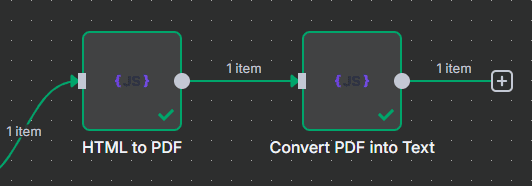
  2. Add the Convert PDF to Text (customJS) node and connect the incoming PDF file to this node.
  3. Configure the node to extract text from the PDF.
  4. The output will provide the extracted text in a string field.
  5. Connect this output to other nodes, such as:
    • Google Sheets to store the extracted data.
    • Code to parse or transform the text before further use.

n8n workflow template: Convert HTML to PDF & extract text from PDFs

This workflow template:

  1. Gets PDF files from a webhook or local storage.
  2. Converts the PDF to text.
  3. Uses the extracted text for further processing.
Use this template

Related Articles

Continue reading on similar topics

Make.com PDF Generation: Complete Guide 2025
·Guide

Make.com PDF Generation: Complete Guide 2025

Learn how to automate PDF generation in Make.com with CustomJS. Step-by-step guide with templates for invoices, HTML to PDF, and page extraction. 600 free PDFs/month.

makepdfautomation
PDF Generation in Power Automate: Complete Guide 2025
·Guide

PDF Generation in Power Automate: Complete Guide 2025

Generate professional PDFs in Power Automate with CustomJS. Create invoices, receipts, reports, and certificates with custom HTML templates, QR codes, and advanced formatting. No Azure Functions required.

power-automatepdfhtml-to-pdf