JSON to TOON Converter
The JSON to TOON Converter node enables seamless bidirectional conversion between JSON and TOON formats in your n8n workflows.
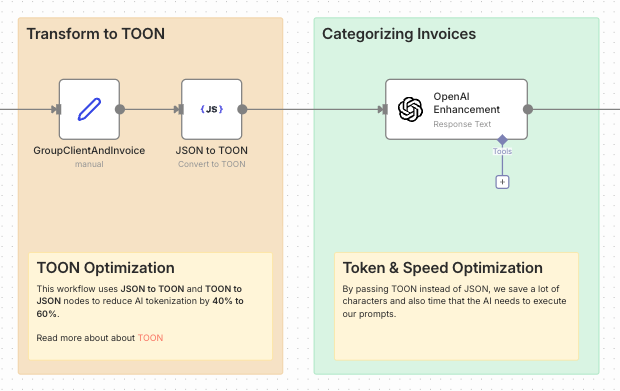
What is TOON?
TOON (Text Object Oriented Notation) is a human-readable data format that provides an alternative to JSON with enhanced readability and flexibility for configuration files, data export, and human-friendly data representation.
Read more about TOON.
TOON Optimization for AI Workflows
Using JSON to TOON and TOON to JSON nodes can reduce AI tokenization by 40% to 60% when working with language models.
Token & Speed Optimization
By passing TOON instead of JSON to AI prompts, you can:
- Save tokens: TOON's compact syntax uses fewer characters than JSON (no quotes around keys, cleaner structure)
- Reduce costs: Fewer tokens mean lower API costs for AI services like OpenAI, Claude, or other LLMs
- Faster processing: Less data to parse means quicker AI response times
- Better readability: AI models can interpret the cleaner format more efficiently
Example comparison:
JSON (125 characters):
{"user":"John","role":"admin","permissions":["read","write","delete"],"active":true}
TOON (85 characters):
user: John
role: admin
permissions: [read, write, delete]
active: true
This workflow pattern is especially valuable when sending large datasets to AI models or when making frequent API calls where token optimization directly impacts your costs.
Node Operations
The JSON to TOON Converter node supports two operations:
1. JSON to TOON
Convert JSON data into TOON format for improved readability.
Input:
{
  "name": "John Doe",
  "age": 30,
  "email": "[email protected]",
  "address": {
    "street": "123 Main St",
    "city": "New York",
    "zipCode": "10001"
  },
  "hobbies": ["reading", "coding", "hiking"]
}
Output:
name: John Doe
age: 30
email: [email protected]
address:
  street: 123 Main St
  city: New York
  zipCode: 10001
hobbies:
  - reading
  - coding
  - hiking
2. TOON to JSON
Parse TOON format back into JSON for processing and API integration.
Input:
product: Laptop
brand: TechCorp
price: 1299.99
specifications:
  processor: Intel i7
  ram: 16GB
  storage: 512GB SSD
  display: 15.6 inch
inStock: true
Output:
{
  "product": "Laptop",
  "brand": "TechCorp",
  "price": 1299.99,
  "specifications": {
    "processor": "Intel i7",
    "ram": "16GB",
    "storage": "512GB SSD",
    "display": "15.6 inch"
  },
  "inStock": true
}
Configuration
Node Parameters
| Parameter | Description | Required |
|---|---|---|
| Operation | Choose between "JSON to TOON" or "TOON to JSON" | Yes |
| Input Data | The data to convert (JSON object or TOON string) | Yes |
| API Key | Your CustomJS API key for authentication | Yes |
Setting up the Node
- Add the node to your workflow from the node palette
- Select the operation (JSON to TOON or TOON to JSON)
- Configure your API key in the credentials section
- Provide input data from previous nodes or manually
- Connect to downstream nodes to use the converted data
API Key Setup
To use the JSON to TOON Converter node, you need a CustomJS API key:
- Visit CustomJS Dashboard
- Sign in or create an account
- Copy your API key from the dashboard
- In n8n, create new credentials for "CustomJS API"
- Paste your API key and save
For detailed instructions, see API Key Documentation.
Related Nodes
- PDF Toolkit - Generate and manipulate PDF files
- Web Scraping - Extract data from websites
- Website Screenshot - Capture website screenshots
- Code Node - Process and transform data with JavaScript