// n8n integration

Convert PDF to PNG

All nodes are available on both n8n Cloud and self-hosted n8n and require you to install the CustomJS community package. See Installation.

The Convert PDF to PNG node allows you to convert PDF files into PNG images within n8n and automate the process.
Convert PDF to PNG node

Convert PDF to PNG

  1. Open a new n8n workflow and add a Webhook node (or use Request HTML or Code if you want to fetch stored PDFs).
  2. Add the Convert PDF to PNG (customJS) node.
  3. Connect the incoming PDF file to this node.
  4. Configure the node to convert each page of the PDF into a PNG image.
  5. (Optional) Add a Respond to Webhook node to return the PNG file(s) to the requester or store them in your chosen destination.

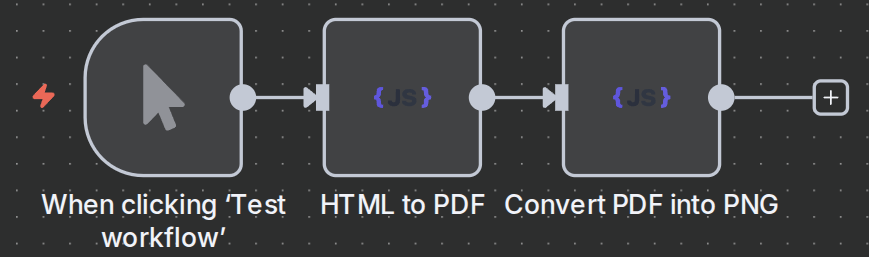
n8n workflow template: Convert HTML & PDF files to PNG images

This workflow template:

  1. Generates PDF files from the requested HTML.
  2. Converts the PDF to PNG.
  3. Uses a Code node to handle URLs that point to PDF files and convert them to PNG.
Use this template

Related Articles

Continue reading on similar topics

Make.com PDF Generation: Complete Guide 2025
·Guide

Make.com PDF Generation: Complete Guide 2025

Learn how to automate PDF generation in Make.com with CustomJS. Step-by-step guide with templates for invoices, HTML to PDF, and page extraction. 600 free PDFs/month.

makepdfautomation
PDF Generation in Power Automate: Complete Guide 2025
·Guide

PDF Generation in Power Automate: Complete Guide 2025

Generate professional PDFs in Power Automate with CustomJS. Create invoices, receipts, reports, and certificates with custom HTML templates, QR codes, and advanced formatting. No Azure Functions required.

power-automatepdfhtml-to-pdf