// n8n integration
Installation
You must first install CustomJS npm package, which contains all CustomJS modules for n8n. The package is available on npmjs at @custom-js/n8n-nodes-pdf-toolkit. This is a community package natively supported by n8n.
Make sure your n8n version supports Community Nodes (>= v0.187.0).
Installation on n8n Cloud
If you're using n8n Cloud, the easiest way to install CustomJS nodes is directly from within a workflow:
- Open any workflow in your n8n Cloud instance.
- In the right sidebar with the list of available nodes, search for "CustomJS".
- Click on any CustomJS node (e.g., HTML to PDF, Invoice Generator) to add it to your workflow.
- n8n will automatically prompt you to install the community package if it's not already installed.
- Confirm the installation and the node will be ready to use.
Alternatively, you can install via Settings > Community Nodes as described below.
Installation via Settings (Cloud & Self-Hosted)
You can also install the community package directly from the n8n editor settings:
- Open your n8n instance (Cloud or self-hosted) in the browser.
- Go to Settings > Community Nodes.
- Click on Install a Community Node.
- Enter the package name:
@custom-js/n8n-nodes-pdf-toolkit, confirm you understand the installation risk, and click Install.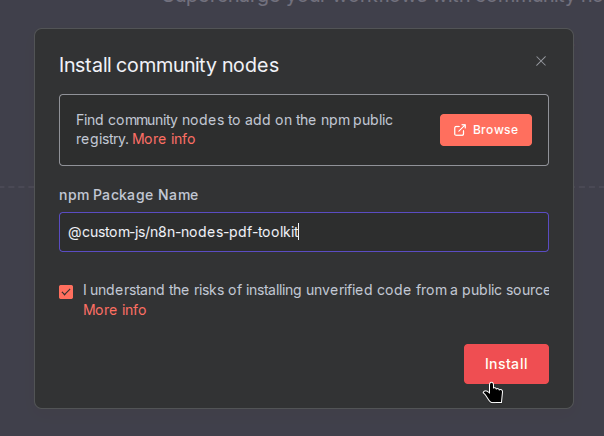
Package Installation - Confirm and restart n8n if prompted. After installation, all CustomJS nodes will be available in the node selector.
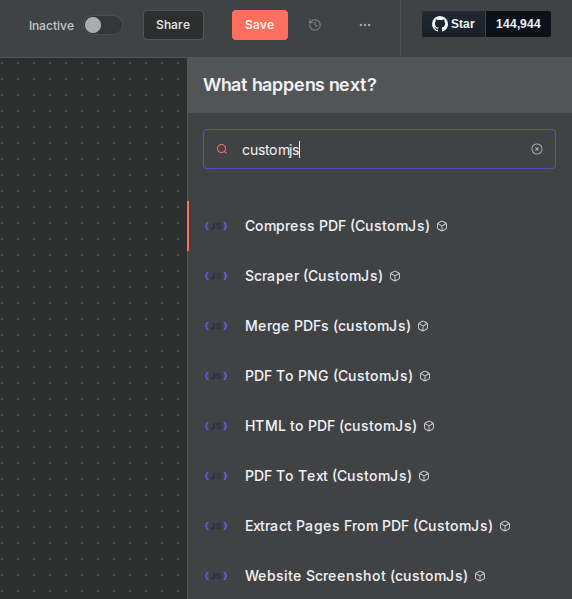
CustomJS Nodes
If the node does not appear, reload the n8n editor UI.