Email to Webhook: Turn Any Email into Automated Workflows (n8n, Make.com & Zapier)
Here's a frustrating scenario you've probably encountered: Your accounting software sends invoice PDFs via email. Your e-commerce platform emails order confirmations. Your monitoring tools fire off alerts to your inbox. All these systems work perfectly fine—except they're stuck in 2010, communicating exclusively through email.
Meanwhile, your shiny new automation workflows in Make.com, n8n, or Zapier are sitting there waiting for webhook triggers that never come. You're left manually copying data from emails into your systems, or worse, building fragile email polling scripts that break every time someone changes an email template.
That's where Mail Hook comes in. Think of it as a translator between the email world and the webhook world. You get a unique email address (something like [email protected]), point your old systems at it, and boom—every email becomes a webhook trigger with all the data neatly structured and ready to use. No coding, no complex setup, just copy and paste.
TL;DR
Create a Mail Hook in 30 seconds—no coding required, just copy & paste.
Get a unique email address that triggers webhooks with structured data (subject, body, attachments).
Perfect for legacy systems that only send emails but need to trigger modern automation.
Native n8n module and Make.com integration—drag & drop setup.
Use cases: invoice processing, support tickets, order notifications, form submissions, system alerts.
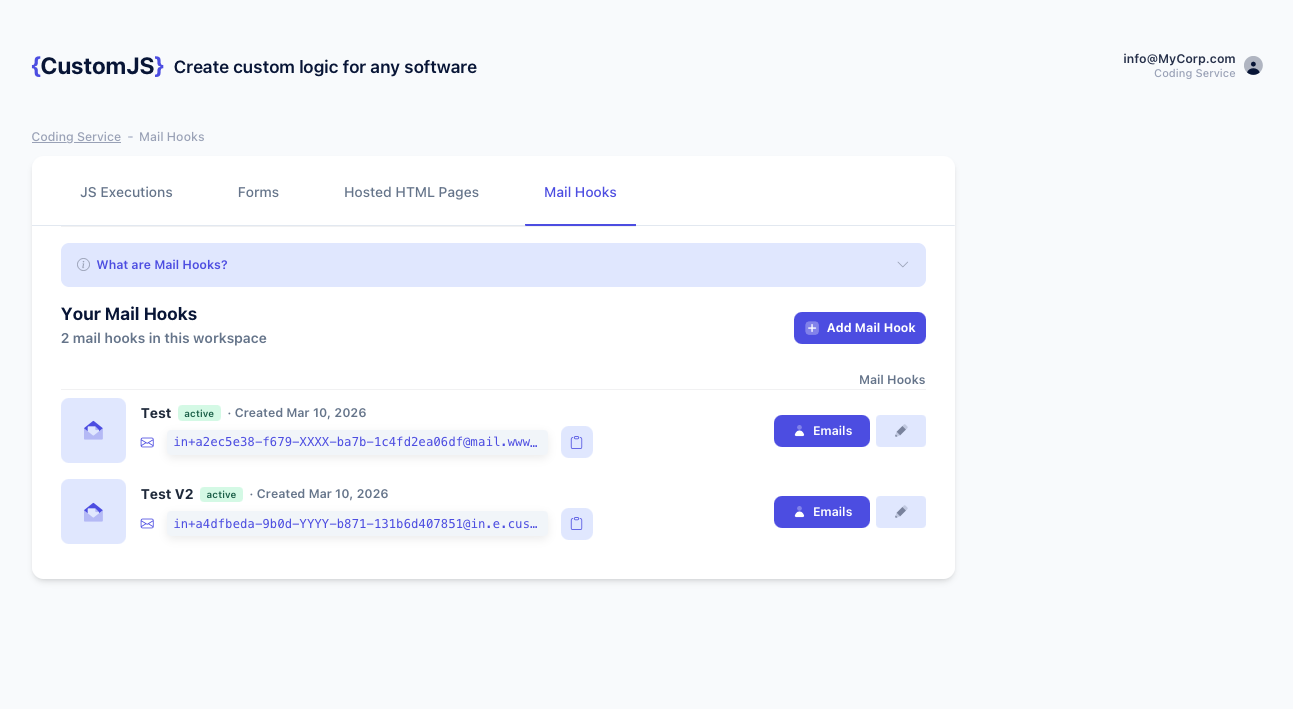
Create a Mail Hook in seconds—just enter your webhook URL and get your unique email address
Why Email-Only Systems Are Holding You Back
Let me paint you a picture. You've spent weeks building this beautiful automation workflow. Orders come in, inventory updates automatically, shipping labels print, customers get tracking numbers—it's a thing of beauty. Except there's one problem: your supplier's system from 2015 only sends order confirmations via email. No API. No webhooks. Just good old-fashioned email.
Sound familiar? You're not alone. I've seen this pattern everywhere:
Accounting software that emails invoices as PDFs but has no webhook support
Contact forms that can only email submissions (looking at you, legacy WordPress forms)
Monitoring tools that alert via email but can't trigger your incident management system
E-commerce platforms where order confirmations arrive in your inbox, not your automation workflow
The usual workaround? Either someone manually copies data from emails (soul-crushing), or you build an email polling script that checks your inbox every few minutes (fragile and breaks constantly). Neither option is great, and both waste time that could be spent on actual work.
Enter Mail Hook: Email Meets Webhooks
Here's the concept: Mail Hook gives you a unique email address that acts as a bridge. When any email lands in that inbox, it immediately fires off a webhook to wherever you want—Make.com, n8n, Zapier, or your own custom endpoint. The email gets parsed automatically, and all the important bits (subject, sender, body, attachments) get packaged up in a nice JSON format ready for your automation to consume.
The setup is almost embarrassingly simple. I'm talking 30 seconds, tops:
The whole process:
1. Create a Mail Hook in the dashboard. You'll get an email address like [email protected]
2. Grab your webhook URL from Make.com, n8n, or Zapier and paste it into the Mail Hook settings
3. Point your old system at that email address and you're done—emails now trigger webhooks
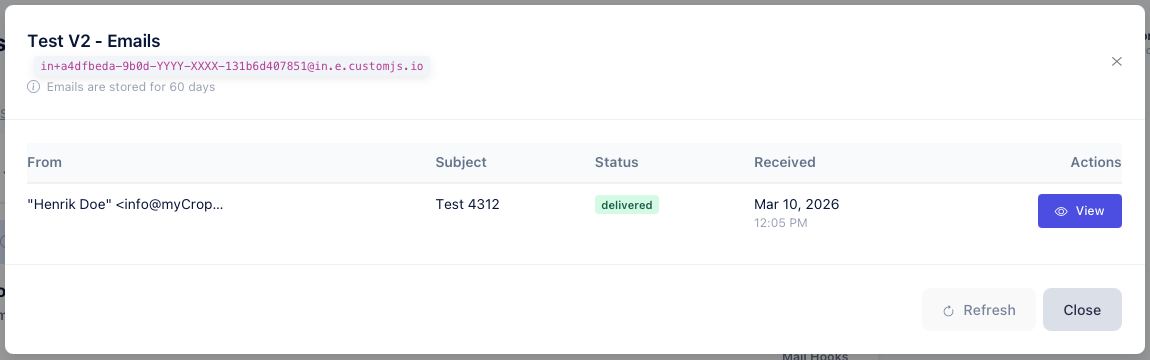
Every email is parsed and delivered with complete details—subject, sender, body, attachments, and metadata
What Data Do You Get?
Every email that hits your Mail Hook gets automatically parsed and sent to your webhook with everything you need. You get the subject line, who sent it, the full email body (both plain text and HTML versions), any attachments with direct download links, plus all the technical metadata like timestamps and message IDs if you need them for more advanced workflows.
The nice thing is it's all structured and consistent. No matter what format the original email was in, your webhook always receives the same clean data structure. Makes building workflows much easier when you're not constantly dealing with edge cases.
How It Works Behind the Scenes
You don't really need to know the technical details (it just works), but if you're curious: when an email hits your Mail Hook address, it gets received by our mail servers, parsed to extract all the relevant data, and then immediately fires off a webhook to your endpoint. The whole thing happens in about 1-2 seconds.
Any attachments get uploaded to secure storage and you receive direct download URLs that work for 60 days. No need to worry about email size limits or attachment handling—it's all taken care of automatically.
1
Email Arrives
Someone (or some system) sends an email to your Mail Hook address. They don't need to do anything special—it's just a regular email.
2
Parsing Happens
We extract the subject, sender, body, attachments—basically everything useful from the email.
3
Webhook Fires
Your webhook endpoint gets called with all the parsed data. Usually happens within a second or two.
4
Your Automation Runs
Make.com, n8n, or Zapier picks up the webhook and runs whatever workflow you've built. Magic happens.
Real-World Use Cases
Enough theory. Let's talk about actual scenarios where this saves people hours every week.
1. Invoice Processing (The Classic)
This is probably the most common use case I see. Your accounting software emails invoices as PDFs, but you want them automatically logged in your system. Maybe you're using Airtable to track everything, or you need them in QuickBooks, or you just want a Slack notification so your accounting team knows there's a new invoice to review.
Here's how it works:
Invoice email hits your Mail Hook → webhook fires instantly
Your Make.com or n8n workflow grabs the invoice number and amount from the email body (usually just a simple text parser)
Downloads the PDF attachment and uploads it to Google Drive or wherever you store documents
Creates a new row in your spreadsheet or accounting system with all the details
Sends a Slack message to your accounting channel: "New invoice #12345 for $1,250 from Acme Corp"
Takes about 5 minutes to set up, saves hours of manual data entry every month.
2. Support Ticket Creation
Got a contact form that only emails you? (I'm looking at you, every WordPress site ever built before 2020.) Point it at a Mail Hook and suddenly those emails become proper support tickets in Zendesk, Freshdesk, or whatever ticketing system you use.
The flow:
Contact form email arrives at your Mail Hook
Webhook triggers your workflow with the customer's email, their message, and the subject line
Create a ticket in your support system with all that info
If the subject contains "urgent" or "critical", bump the priority to high
Ping your support team in Slack so they know there's a new ticket
No more manually creating tickets from emails. No more missed support requests because someone forgot to check the shared inbox.
3. Order Notifications from Old E-commerce Systems
Here's a fun one: you're working with a supplier whose e-commerce system is... let's call it "vintage." They email you order confirmations, but your warehouse management system needs webhook triggers to update inventory. Mail Hook to the rescue.
What happens:
Order confirmation email comes in from their ancient system
Your workflow parses out the order number, items, and quantities (usually they're in a pretty consistent format)
Updates your inventory system to reflect the new stock levels
Maybe generates a shipping label automatically if you're fancy
Sends the customer a tracking number via SMS or email
Turns a manual process that used to take 10-15 minutes per order into something that happens automatically in seconds.
4. Turning Server Alerts into Action
Your monitoring tool sends email alerts when something breaks. That's great, except emails aren't exactly the best way to wake someone up at 3 AM. With Mail Hook, those alerts can trigger PagerDuty incidents, send SMS messages to your on-call engineer, and post to your Slack incidents channel—all automatically.
How it works:
Monitoring system emails an alert to your Mail Hook
Your workflow checks if the subject line contains "[CRITICAL]" or "[ERROR]"
If it's critical, creates a PagerDuty incident and sends an SMS to whoever's on call
Posts the full alert details to your #incidents Slack channel
If it's just a warning, maybe just the Slack notification
Way better than relying on someone checking their email at 3 AM.
5. Lead Capture from Legacy Forms
You know those old contact forms that just email you the submission? The ones where you have to manually copy the person's info into your CRM? Yeah, those. Point them at a Mail Hook and suddenly every form submission becomes a proper lead in HubSpot, Salesforce, or whatever CRM you're using.
The automation:
Form gets submitted, email arrives at your Mail Hook
Parse out the name, email, phone number, and message from the email body
Create a new lead in your CRM with all that info
Maybe assign it to a sales rep based on territory or what product they asked about
Kick off your email nurture sequence automatically
Drop a message in your #sales Slack channel so the team knows there's a new lead
No more leads falling through the cracks because someone forgot to check the contact form email.
Setting Up with n8n
If you're using n8n, you're in luck—there's a native CustomJS node that makes this ridiculously easy. No webhook URLs to copy, no manual configuration. Just install the node and you're good to go.
🎯 n8n Native Module
1
Install the node: Settings → Community Nodes → Search "n8n-nodes-customjs" → Install
2
Drag it into your workflow: Look for "CustomJS Mail Hook Trigger" in your node list
3
Enter your API key: The node creates your Mail Hook automatically and shows you the email address
4
Connect your workflow: Drag in whatever nodes you need (Slack, Sheets, your CRM, whatever)
That's it. The trigger node gives you all the email data—subject, sender, body in both plain text and HTML, attachments with download URLs, all the metadata. Just connect it to the rest of your workflow and you're done.
Setting Up with Make.com
Make.com users have two options, both super straightforward. Pick whichever one fits your workflow better.
📦 Option 1: Use the CustomJS Module
Easiest if you're already using other CustomJS features:
Add the CustomJS module to your scenario
Pick the "Create Mail Hook" action
Drop in your API key
Copy the email address it generates
Done—start building the rest of your scenario
🔗 Option 2: Standard Webhook
More flexible if you want full control:
Add a "Webhooks" → "Custom webhook" trigger
Copy that webhook URL
Head to the CustomJS dashboard and create a Mail Hook
Paste in the webhook URL
Test it by sending an email
💡 Quick Example: Invoice → Google Sheets
Here's a simple scenario you can build in Make.com's visual builder in about 5 minutes:
Webhook catches the email from your Mail Hook
Text Parser extracts the invoice number and amount (Make has this built in, super easy)
Google Sheets adds a row with all the invoice details
Slack posts a message to your accounting channel
No code required. Just drag, drop, and connect the modules.
Setting Up with Zapier
Zapier doesn't have a native Mail Hook integration (yet), but the standard webhook trigger works perfectly fine. Takes maybe a minute to set up.
⚡ The Setup Process
1
Start a new Zap with "Webhooks by Zapier" as your trigger
2
Pick "Catch Hook" and copy the webhook URL Zapier gives you
3
Head to CustomJS, create a Mail Hook, paste in that webhook URL
4
Send a test email to your Mail Hook address to test the connection
5
Zapier catches the data, now build the rest of your Zap
💡 Mail Hook vs. Zapier's Email Parser
Yeah, Zapier has its own email parser. But Mail Hook is better for a few reasons: you get instant setup (no template configuration), complete data including HTML body and attachments with download URLs, and the same Mail Hook works across Zapier, Make, n8n, and your own custom APIs. More flexible.
Working with the Email Data
Once the webhook fires, you've got all the email data to work with. Here's how to actually use it in your workflows.
Pulling Out Specific Info
Need to extract an invoice number or order ID from the email body? Every automation platform has built-in tools for this. Make.com has its Text Parser module, n8n has Extract from Text nodes, Zapier has Formatter. They all work basically the same way—you tell them what pattern to look for (like "Invoice #" followed by numbers) and they pull it out for you. No coding required.
HTML vs Plain Text
You get both versions of every email. Plain text is easier to parse for simple stuff. HTML is useful when you need to extract data from specific elements (like pulling numbers out of a table), or when you want to preserve the formatting for display somewhere.
Dealing with Attachments
Attachments come through as download URLs. So if someone emails an invoice PDF to your Mail Hook, you get a direct link to download that PDF. From there, you can grab it with an HTTP Request node and upload it to Google Drive, Dropbox, S3, wherever you need it. The URLs work for 60 days, which is plenty of time for any reasonable workflow.
Troubleshooting Common Issues
Emails Not Triggering Webhook
Check spam folder: Some email servers may flag the Mail Hook address
Verify email address: Ensure you're sending to the exact Mail Hook address
Check webhook URL: Verify the webhook URL is correct and accessible
Review logs: Check CustomJS dashboard for delivery logs and errors
Missing Attachments
Size limits: Attachments over 25MB are not supported
Download timing: Attachment URLs expire after 30 days
Authentication: Some attachment URLs require authentication headers
Parsing Errors
Email format variations: Test with multiple email formats from your source
Character encoding: Handle special characters and different encodings
Regex patterns: Make patterns flexible to handle format variations
Fallback values: Always provide default values for missing data
Webhook Timeout
Response time: Webhook endpoints must respond within 30 seconds
Async processing: Return 200 OK immediately, process data asynchronously
Retry logic: Failed webhooks are retried up to 3 times with exponential backoff
Security and Privacy Considerations
Email Address Security
Your Mail Hook email address should be treated as a secret:
Unique addresses: Create separate Mail Hooks for different sources
Regenerate if exposed: Delete and create new Mail Hook if address is compromised
Access control: Only share with trusted systems and team members
Data Privacy
Email retention: Emails are stored for 30 days, then automatically deleted
Attachment storage: Attachments are encrypted at rest and in transit
GDPR compliance: Request data deletion at any time via API or dashboard
No email scanning: Email content is not analyzed or used for any purpose except delivery
Webhook Security
Secure your webhook endpoints:
HTTPS only: Always use HTTPS webhook URLs
Signature verification: Verify webhook signatures to prevent spoofing
IP allowlisting: Restrict webhook access to CustomJS IP addresses
Rate limiting: Implement rate limiting on your webhook endpoint
Pricing and Limits
CustomJS Mail Hook is included in all CustomJS plans:
Free Tier: 600 emails per month (no credit card required)
Pretty much instant. Emails usually trigger webhooks within 1-2 seconds. Sometimes a bit longer if there's high load, but we're talking 5-10 seconds max, not minutes.
Can I create multiple Mail Hooks?
Yep, as many as you want. Each one gets its own unique email address and can point to a different webhook. Useful if you want separate Mail Hooks for invoices, support tickets, alerts, etc.
What if my webhook is down when an email arrives?
We retry failed webhooks automatically—3 times with increasing delays (1 minute, 5 minutes, 15 minutes). If all 3 fail, you can manually retry from the dashboard. The email data is stored for 60 days so you won't lose anything.
Can I filter which emails trigger webhooks?
Yes. You can set up filters based on sender email, subject line keywords, or whether there are attachments. Prevents spam or unwanted emails from triggering your workflows.
What about email threads and replies?
Each email in a thread triggers its own webhook. The email headers include thread info (In-Reply-To, References) so you can group related emails in your workflow if you need to.
Can I send emails FROM my Mail Hook address?
Nope, they're receive-only. Security thing—prevents people from using Mail Hooks to send spam.
How do I test it?
Just send an email to your Mail Hook address from Gmail or whatever email client you use. The webhook fires immediately and you can see the data in your automation platform. Super easy to test.
Wrapping Up
Look, the reality is that a lot of business-critical systems still communicate via email. Your accounting software, your suppliers' order systems, your monitoring tools—they're not going away anytime soon, and most of them aren't getting webhook support added.
Mail Hook is basically a translator. It sits between your email-based systems and your modern automation workflows, converting those emails into webhook triggers that Make.com, n8n, or Zapier can actually work with. No more manual data entry, no more fragile email polling scripts, no more leads falling through the cracks.
Setup takes about 30 seconds. Create a Mail Hook, copy the email address, paste your webhook URL. Done. Then every email becomes a structured webhook with all the data you need—subject, sender, body, attachments, everything.
If you're tired of manually processing emails or building hacky workarounds, give it a shot. First 600 emails per month are free.
Automate lead generation and user onboarding with form webhooks. Connect forms to Make.com, n8n, and Zapier for instant CRM updates, email sequences, and team notifications. 600 free submissions/month.
Generate HTML forms with AI (no form builder) and send submissions to webhooks that trigger Make.com and n8n workflows. Includes copy-paste code and best practices.