The Best Form Builders for Automation in 2026: CustomJS vs. Typeform vs. Jotform vs. Tally vs. Fillout
The "Contact Us" form is dead. In 2026, forms are the front-end of your business logic. Whether you're onboarding a new client, generating a lead, or creating a dynamic PDF report, the tool you choose determines how much you pay in "hidden" automation costs.
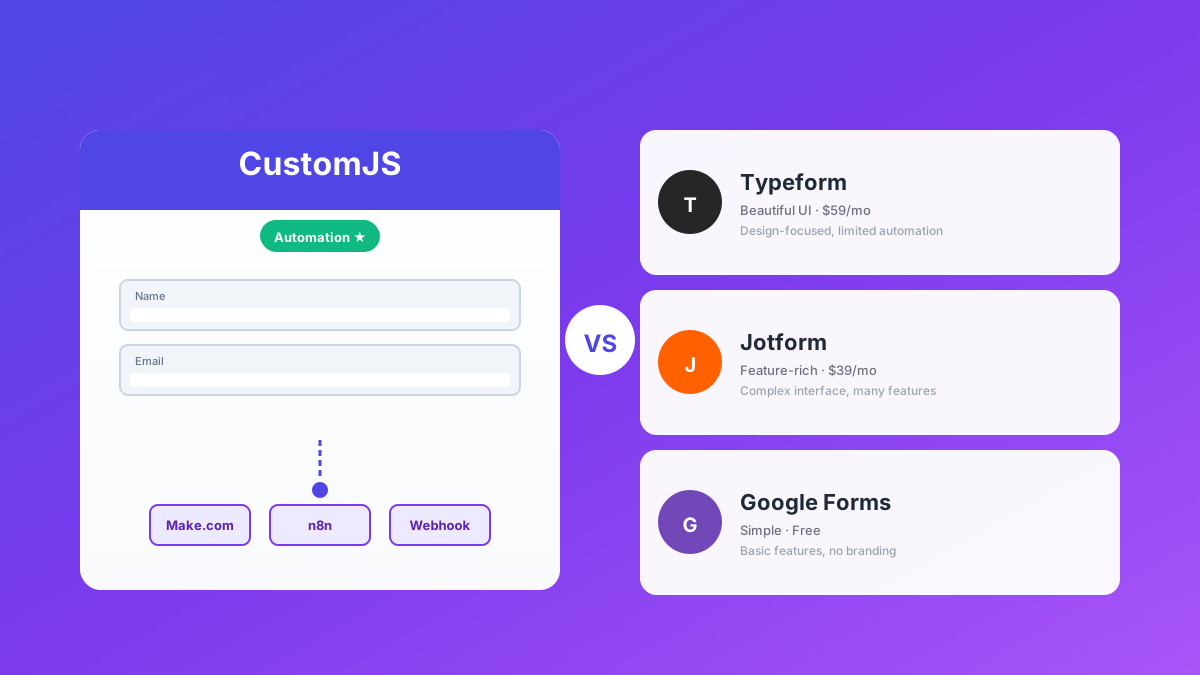
Today, we compare the "Big Players" against the "Automation Specialists" to see which one gives you the most power for your dollar. We'll examine CustomJS, Typeform, Jotform, Tally.so, and Fillout across pricing, automation capabilities, and real-world use cases.
TL;DR
Typeform: Beautiful UX, but expensive (~$53/mo for white-label). Best for high-end brand design and simple surveys.
Jotform: Established player with good features. White-label starts at $39/mo. Solid middle-ground option.
Tally.so: Best free tier with unlimited forms. White-label at $22/mo. Limited advanced logic.
Fillout: Database specialist for Airtable/Notion. White-label at $40/mo. Great for complex data sync.
CustomJS: Automation platform with native JavaScript execution, PDF generation, and white-label at $9/mo (from 9 forms plan). No coding required for basic features.
Choose based on your priority: Design (Typeform), Established platform (Jotform), Free tier (Tally), Database sync (Fillout), or Automation power (CustomJS).
The Contenders at a Glance
Before diving deep, here's a quick comparison of what each platform offers:
Feature
CustomJS
Typeform
Jotform
Tally
Fillout
Best For
Automation & Marketing
High-End Design
Established Platform
Free Tier
Database Sync
White-label
$9/mo
~$53/mo
$39/mo
$22/mo
$40/mo
Unique Power
JS + PDF
Beautiful UX
35M+ Users
Unlimited Free
Airtable/Notion
Webhooks
✓ Programmable
✓ Native
✓ Native
✓ Native
✓ Native
Free Tier
500/mo
10/mo
100/mo
Unlimited
Unlimited
💰 White-Label Pricing Comparison
$9/mo
CustomJS
$22/mo
Tally
$39/mo
Jotform
$40/mo
Fillout
$53/mo
Typeform
✨ CustomJS offers the most affordable white-label at just $9/mo - save $156-636/year!
1. Typeform: The Beauty, but at a Price
Typeform is the "Apple" of form builders. It looks stunning and the user experience is flawless. The one-question-at-a-time interface creates a conversational flow that significantly boosts completion rates.
The Pro: Highest Conversion Rates
If you're running B2C surveys or lead generation campaigns where design matters, Typeform delivers. Studies show their conversational interface can improve completion rates by 20-30% compared to traditional forms.
The Con: Extremely Expensive
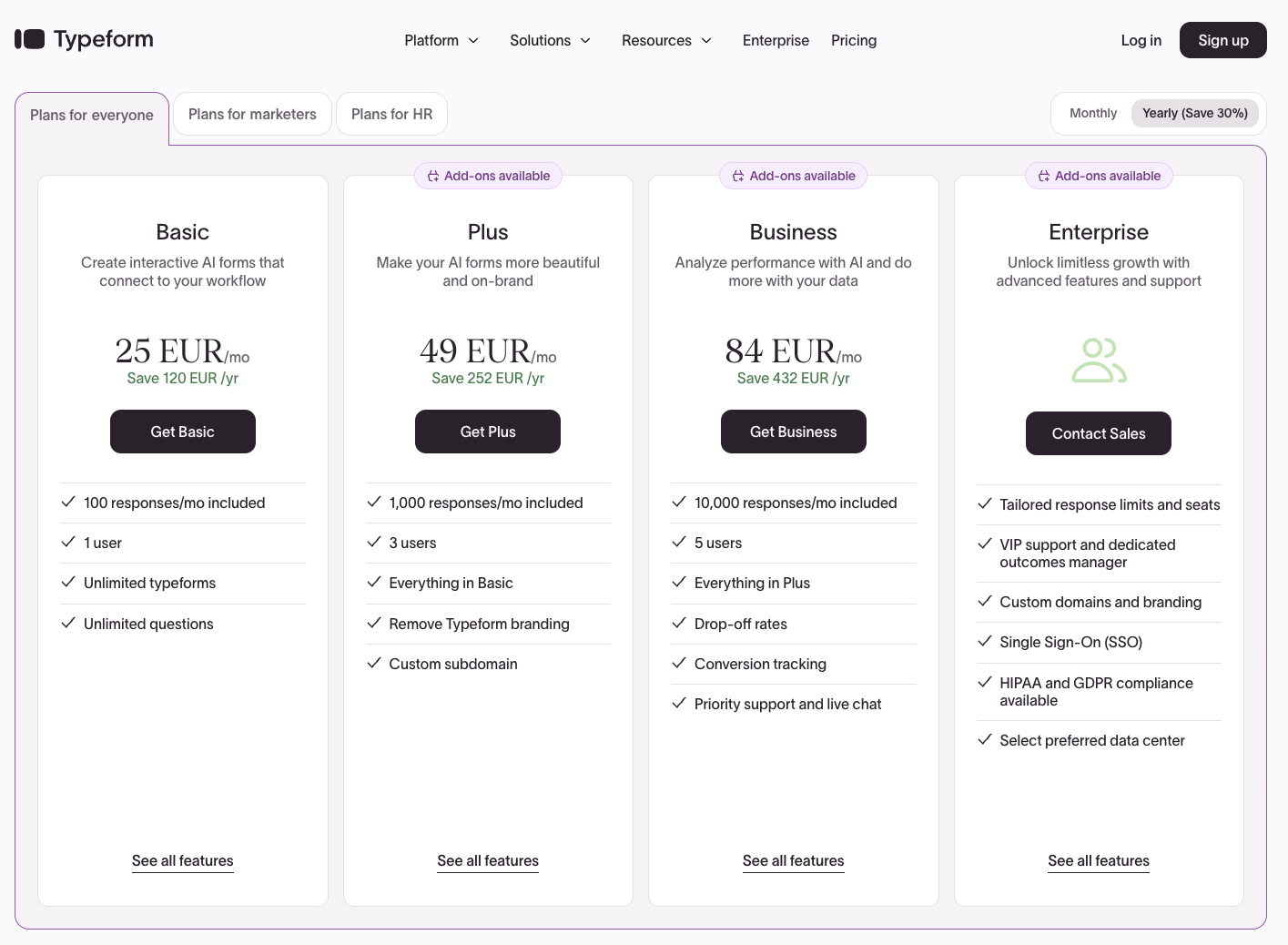
Here's where it hurts: The free plan only allows 10 responses per month. If you need more, you're looking at €25/month (~$27) minimum. Want to remove their branding? That's €49/month (~$53) on the Plus plan. The Business plan costs €84/month (~$91).
For a small business collecting 100 leads per month, you're paying €588/year (~$636/year) just for form submissions. That's before you factor in automation costs with Make.com or Zapier.
The Automation Verdict
Good webhooks, but you pay a premium for the "look," not the "logic." If you need to generate PDFs, send custom emails, or perform complex calculations, you'll need third-party tools that add to your monthly bill.
Typeform Pricing (Screenshot)
2. Jotform: The Established Player
Jotform has been around since 2006 and is trusted by over 35 million users. It's the "safe choice" - mature, feature-rich, and well-documented.
The Pro: Proven Platform with Great Features
Jotform offers a comprehensive feature set including conditional logic, payment integrations, HIPAA compliance (on higher tiers), and a massive template library. The platform is stable, well-supported, and integrates with virtually every major service.
Key advantages:
35+ million users - battle-tested platform
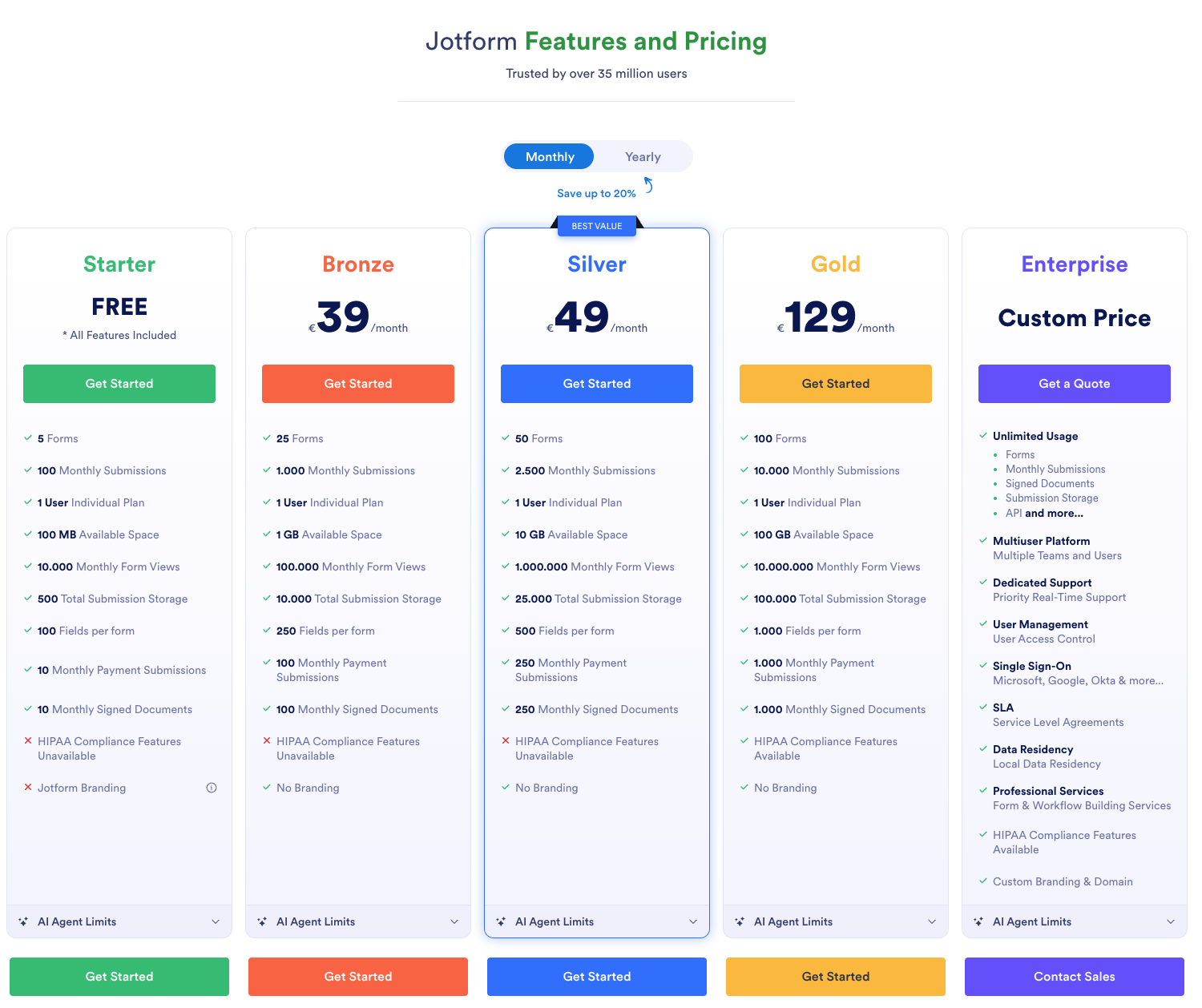
White-label ("No Branding") starts at just $39/month (Bronze plan)
100 monthly submissions on free tier
Extensive integrations and templates
HIPAA compliance available (Gold plan)
The Con: Middle-of-the-Road Pricing
While cheaper than Typeform for white-label ($39 vs $53), Jotform is more expensive than Tally ($22) or CustomJS ($9). The Bronze plan ($39/mo) gives you 1,000 monthly submissions and no branding, which is decent value.
However, if you need advanced features like HIPAA compliance or higher submission limits, you'll jump to the Gold plan at $129/month - a significant price increase.
The Automation Verdict
Solid choice for businesses that want a proven platform with good support. Better value than Typeform for white-label, but still requires external tools for PDF generation and advanced automation. Good middle ground between premium (Typeform) and budget (Tally) options.
Jotform Pricing (Screenshot)
3. Tally.so: The "Notion" of Forms
Tally has disrupted the market by making almost everything free. It's the form builder equivalent of Notion - simple, clean, and generous with its free tier.
The Pro: Unbeatable Free Tier
You get unlimited forms and unlimited responses for $0. That's not a typo. Tally's free tier is genuinely useful for small businesses, side projects, and MVPs. The interface is Notion-like, making it familiar for many users.
The Con: Limited Advanced Logic
If you need to perform complex calculations, conditional logic, or generate custom documents (like PDFs) on the fly, Tally needs to be connected to 3rd party tools. This means your Make.com or n8n bill goes up to compensate.
For example, if you want to generate an invoice PDF from form data, you'll need:
Tally form (free)
Make.com or n8n workflow ($9-29/month)
PDF generation service ($10-50/month)
Suddenly, your "free" form costs $20-80/month in automation.
The Automation Verdict
Great for simple forms, but automation costs add up quickly. Best for projects where you don't need complex post-submission logic.
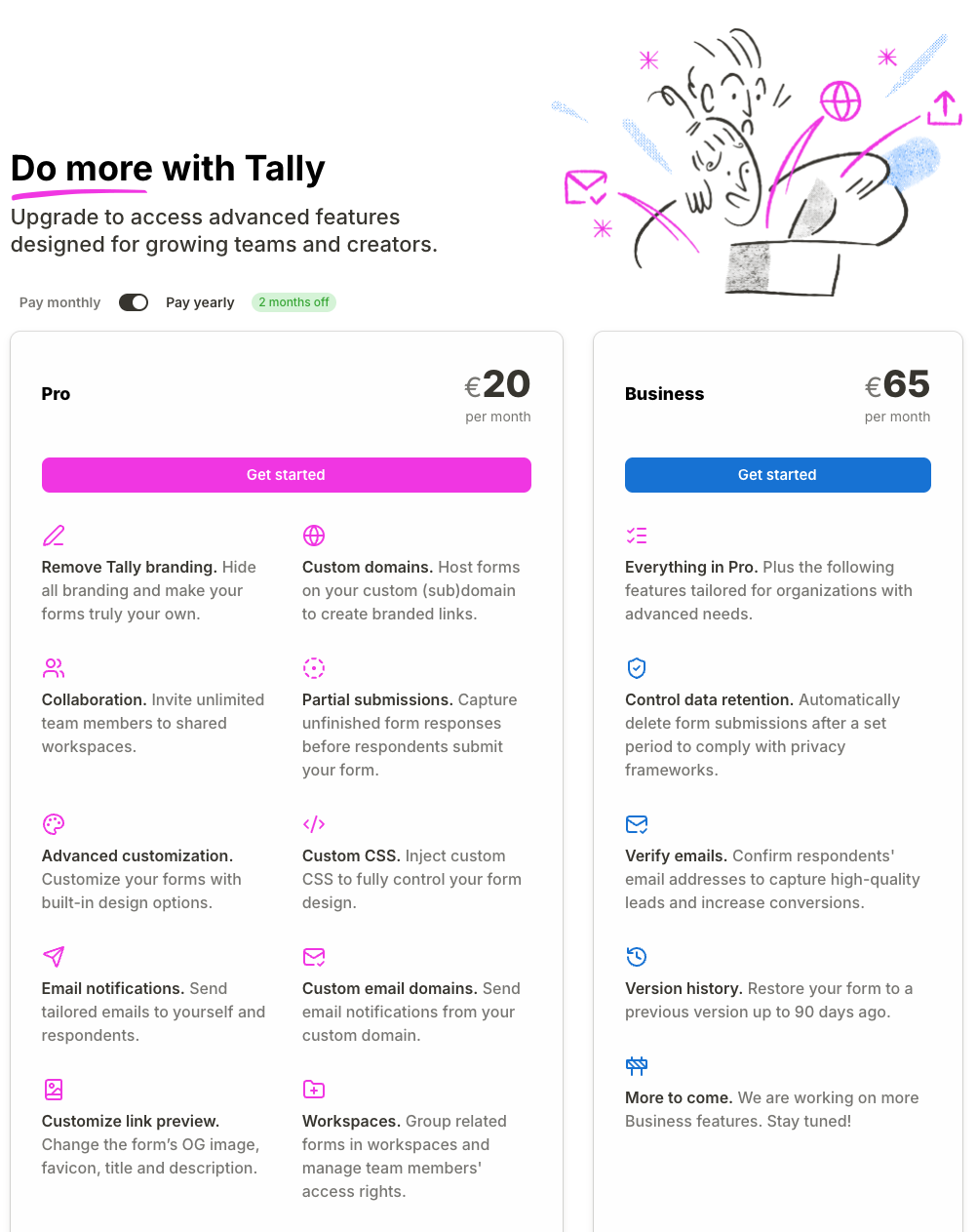
Tally Pricing (Screenshot)
4. Fillout: The Data Specialist
Fillout is excellent for those who live in Airtable or Notion. It's designed to pull data from databases and push submissions back seamlessly.
The Pro: Database Integration Master
Fillout can pull data out of your database to populate form fields dynamically. For example, you can create a customer portal where users select their account from a dropdown populated from Airtable, then update their information directly.
This is incredibly powerful for:
Customer portals and self-service forms
Internal tools that need to read/write to databases
Multi-step workflows with data validation
The Con: Complexity and Pricing Jumps
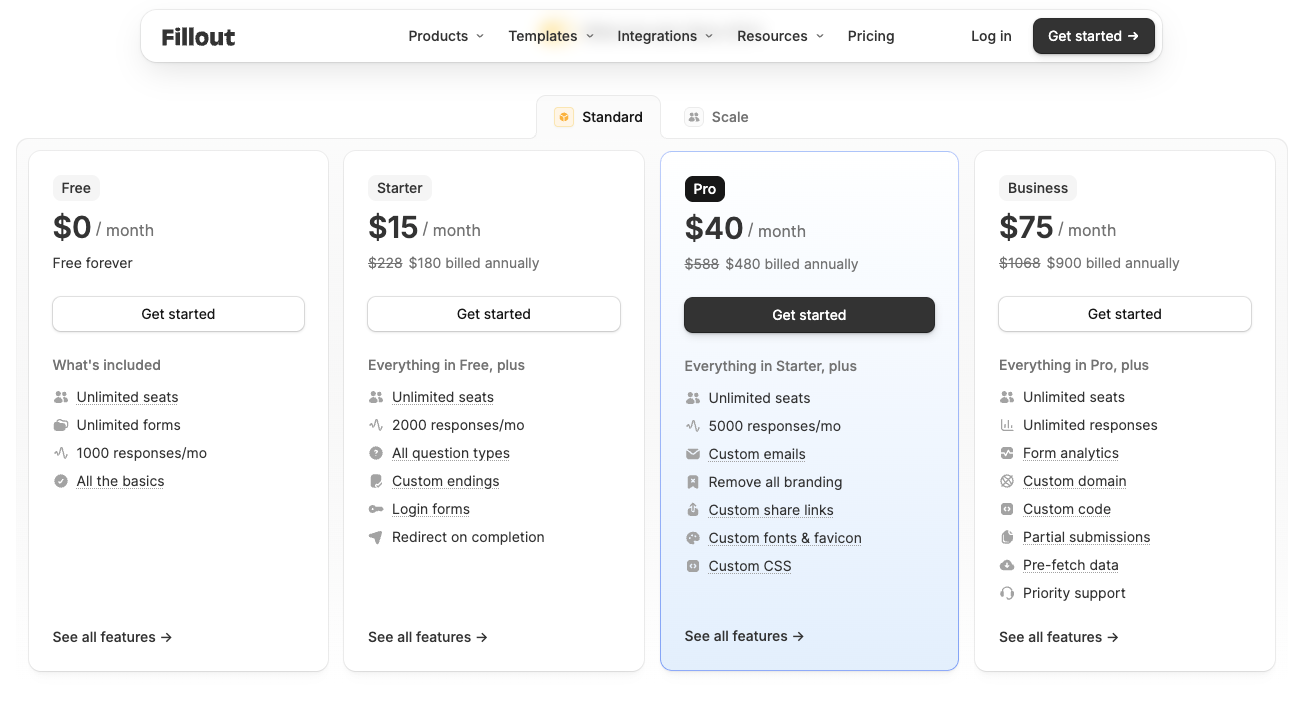
It can get technical very quickly. Setting up database connections, field mappings, and conditional logic requires understanding data structures. The pricing tiers also jump significantly - the Starter plan ($15/mo) includes branding, so you need the Pro plan at $40/month for white-label.
The Automation Verdict
Perfect if your workflow centers around Airtable or Notion. Less ideal if you need JavaScript execution, PDF generation, or custom automation logic.
Fillout Pricing (Screenshot)
5. CustomJS: The "Automation First" Platform
CustomJS takes a different approach: instead of being a form builder with automation bolted on, it's an automation platform that happens to include forms.
The Pro: Native JavaScript + PDF Rendering
Here's what sets CustomJS apart: you can execute JavaScript directly in your form submissions. This means you can:
Generate PDF invoices, receipts, or certificates instantly
Perform complex calculations without external services
Transform data before sending to webhooks
Integrate with Make.com and n8n natively
The interactive demo above shows how CustomJS forms can generate PDFs directly from submissions. Try filling out the form to see the automation in action.
The Con: Learning Curve for Advanced Features
While CustomJS offers powerful automation features, some advanced capabilities require basic technical knowledge. However, for common use cases like PDF generation and form automation, you can use pre-built templates without any coding.
If you work with Make.com/n8n or have basic technical skills, CustomJS gives you significantly more power for less money. But even non-technical users can benefit from the built-in PDF generation and email automation.
The Automation Verdict
Best value for automation-heavy workflows. Native JavaScript execution and PDF generation eliminate the need for multiple services, reducing both cost and complexity.
Integration with Make.com and n8n
All four platforms support webhooks, but the integration experience varies significantly.
Typeform Integration
Typeform has native Make.com and Zapier modules. The integration is straightforward, but you'll need additional modules for any advanced processing (calculations, PDF generation, etc.).
Tally Integration
Tally uses webhooks for integration. You'll set up a webhook URL in Make.com or n8n, then Tally sends form data as JSON. Works well, but requires manual webhook configuration.
Fillout Integration
Similar to Tally, Fillout uses webhooks. The advantage is that Fillout can pre-process data from your database before sending to Make.com/n8n, reducing the complexity of your automation workflows.
CustomJS Integration
CustomJS has native modules for both Make.com and n8n. You can execute JavaScript directly in the form submission, generate PDFs, and send processed data to your workflows. This means fewer steps in your automation and lower operation costs.
Alternative: Headless Forms for Maximum Flexibility
If you want complete control over your form design and user experience, consider using a headless form backend instead of a traditional form builder.
With headless forms, you build your own form UI using HTML/CSS/JavaScript (or React, Vue, etc.), and the backend handles submissions, validation, and automation. This approach gives you:
Complete design freedom: Your forms look exactly how you want them, matching your brand perfectly
Better performance: No iframe embeds or external scripts slowing down your site
Full control: Custom validation, multi-step forms, conditional logic - all in your code
Native integration: Forms are part of your website, not embedded widgets
CustomJS offers a powerful headless form backend that handles submissions, spam protection, file uploads, and automation - while you maintain complete control over the frontend.
When to choose headless forms:
You have developers on your team or work with a web agency
You need forms that perfectly match your brand and design system
You want maximum page speed and SEO performance
You're building complex, multi-step forms with custom logic
You want to avoid vendor lock-in with proprietary form builders
The right choice depends on your priorities and technical comfort level.
Choose Typeform if:
Design and UX are your top priority
You're running high-value B2C campaigns where conversion rates matter more than cost
You have budget for premium tools ($50-100/month)
You need minimal technical setup
Choose Jotform if:
You want a proven, established platform with 35M+ users
You need HIPAA compliance for healthcare forms
You want white-label at a reasonable price ($39/mo)
You prefer extensive templates and integrations
You want a middle-ground between premium and budget options
Choose Tally if:
You need a free solution for simple forms
You're building an MVP or side project
You don't need complex automation or PDF generation
You want a Notion-like interface
White-label at $22/mo is acceptable for your budget
Choose Fillout if:
Your workflow centers around Airtable or Notion
You need to pull data from databases to populate forms
You're building customer portals or internal tools
You're comfortable with database concepts
Choose CustomJS if:
You need to generate PDFs, invoices, or receipts from form data
You want built-in automation without external services
You're using Make.com or n8n for automation
You want to minimize your monthly automation costs
You want white-label forms at the lowest price ($9/mo)
Our Recommendation
For most automation-focused workflows, CustomJS offers the best value. At just $9/month, you get white-label forms, built-in automation, PDF generation, and native Make.com/n8n integration - features that would cost $22-97/month with other platforms. No coding required for basic features.
If you're running a marketing campaign where design is critical and budget isn't a concern, Typeform's superior UX might justify the €49/mo (~$53) premium. For established businesses wanting a proven platform, Jotform at $39/mo is a solid middle-ground. For simple forms with no automation needs, Tally's free tier is unbeatable.
Real-World Use Cases
1. SaaS Onboarding Flow
Scenario: You need to collect user information, generate a welcome PDF, and send it via email.
Scenario: Users update their information, which syncs to Airtable.
Fillout: $40/month (Pro plan for white-label)
CustomJS: $9/month + custom Airtable integration via API
For pure database sync, Fillout might be easier to set up. For database sync + PDF generation, CustomJS wins on both cost ($9 vs $40/mo) and features.
4. High-End Marketing Campaign
Scenario: Lead generation form for luxury brand where design is critical.
Typeform: $53/month (worth it for the UX)
Jotform: $39/month (good alternative with professional design)
Others: Less polished design might hurt conversion rates
In this case, Typeform's premium is justified if the improved UX increases conversions by even 5-10%.
Pricing Breakdown: Total Cost of Ownership
Let's calculate the true cost of each platform for a typical automation workflow (100 submissions/month, PDF generation, email automation):
Cost Component
Typeform
Jotform
Tally
Fillout
CustomJS
Form Platform
$53/mo
$39/mo
$0/mo
$40/mo
$9/mo
Automation (Make/n8n)
$29/mo
$29/mo
$29/mo
$29/mo
$0 (built-in)
PDF Generation
$15/mo
$15/mo
$15/mo
$15/mo
$0 (built-in)
Email Service
$0 (Make)
$0 (Make)
$0 (Make)
$0 (Make)
$0 (built-in)
Total/Month
$97
$83
$44
$84
$9
Total/Year
$1,164
$996
$528
$1,008
$108
💰 For automation-heavy workflows, CustomJS can save you $420-1,056 per year compared to other platforms - at just $9/month!
Frequently Asked Questions
1. Can I use CustomJS without knowing JavaScript?
Absolutely! CustomJS provides pre-built templates for common use cases (invoices, receipts, tickets, marketing materials). You can use these without writing any code. The platform is designed to be accessible for marketers and non-technical users, while also offering advanced features for developers who want more control.
2. Which platform has the best free tier?
Tally.so has the most generous free tier with unlimited forms and responses. However, you'll need paid tools for automation and PDF generation. CustomJS offers 500 free submissions/month with built-in automation and PDF generation.
3. Can I migrate from Typeform to CustomJS?
Yes. You can export your Typeform data and recreate forms in CustomJS. The migration process typically takes 1-2 hours per form, depending on complexity. Our support team can help with the transition.
4. Do all platforms work with Make.com and n8n?
Yes, all five platforms support webhooks, which work with Make.com and n8n. CustomJS has native modules for both platforms, making integration easier and reducing the number of workflow steps.
5. Which platform is best for generating invoices?
CustomJS is specifically designed for this use case. It can generate professional PDF invoices directly from form submissions without requiring external services. Check out our HTML Invoice Generator guide for templates and examples.
6. Can I white-label these form builders?
Yes, but pricing varies significantly: CustomJS ($9/mo), Tally ($22/mo), Jotform ($39/mo), Fillout ($40/mo), Typeform ($53/mo). CustomJS offers the most affordable white-label option.
7. Which platform is best for Airtable integration?
Fillout is specifically designed for Airtable and Notion integration. It can read from and write to Airtable bases seamlessly. CustomJS can also integrate with Airtable via API, but requires more setup.
8. How do conversion rates compare?
Typeform typically has the highest conversion rates (20-30% better than standard forms) due to its conversational interface. However, for B2B or technical audiences, the difference is less significant. Test your specific audience to determine if the premium is worth it.
9. Is Jotform a good alternative to Typeform?
Yes, Jotform is an excellent middle-ground option. At $39/mo for white-label (vs Typeform's $53/mo), you get a proven platform with 35M+ users, extensive templates, and HIPAA compliance options. The design isn't as polished as Typeform, but it's professional and feature-rich.
Conclusion
Choosing the right form builder in 2026 depends on your specific needs and budget. Typeform excels at design and UX but comes with a premium price tag (\u20ac49/mo). Jotform offers a proven platform with 35M+ users at a reasonable $39/mo. Tally provides an unbeatable free tier for simple forms. Fillout is the database integration specialist. CustomJS delivers the best value for automation-heavy workflows with built-in JavaScript execution and PDF generation.
For most automation-focused workflows - whether you're a marketer, business owner, or developer - CustomJS offers the best combination of features and price. At just $9/month, you get everything you need for form automation, PDF generation, white-label branding, and webhook integration - features that would cost $22-97/month with other platforms.
Ready to try CustomJS? Start with our free tier (500 submissions/month) and see how much you can save on your automation stack.
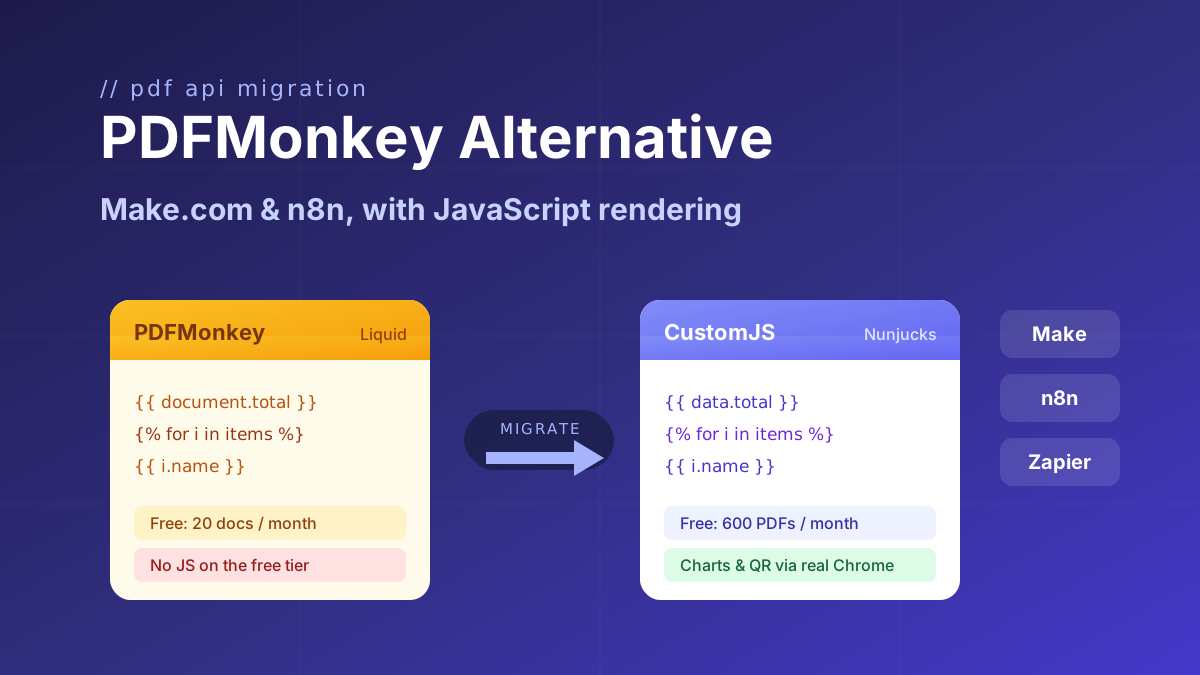
Looking for a PDFMonkey alternative? Compare PDFMonkey vs CustomJS on price, free tier, and JavaScript rendering, with a step-by-step Make.com and n8n migration guide. 600 free PDFs/month.
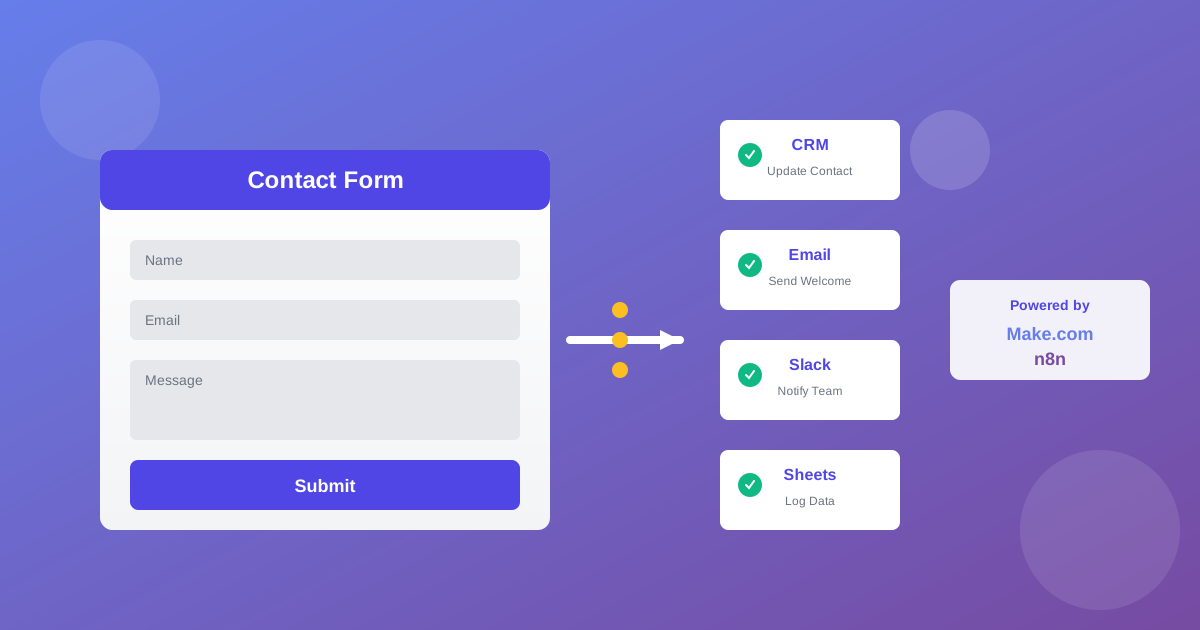
Automate lead generation and user onboarding with form webhooks. Connect forms to Make.com, n8n, and Zapier for instant CRM updates, email sequences, and team notifications. 600 free submissions/month.