Pipedrive PDF Quotes: 3 Ways to Generate Documents From Deal Data
A Pipedrive deal already holds everything a quote needs. The value, the currency, the products, the linked person, the organization, the close date. What Pipedrive will not do is turn that into a branded PDF on your own letterhead. Smart Docs is the native answer. It comes bundled on the top plans and costs extra below them, and either way you build inside Pipedrive's template editor. Ask it for your real fonts, a discount column, a signature block, or a second page of terms and you end up negotiating with a template builder instead of sending the quote.
Here is the part most guides get wrong. They assume the automated path is the expensive path, so they route everything through Zapier or Make and bill you for middleware. On Pipedrive that assumption is just false. Webhooks are available on every plan. A deal moving to "Qualified" can call your own endpoint directly. No automation tier, no add-on, no middleware subscription. That one fact reshapes the whole build.
This guide shows three ways to wire it up. One function reads a deal and fills a PDF template you designed once. A link, an automation, or a webhook decides who pulls the trigger. This is the Pipedrive-specific recipe from our broader work on HTML to PDF conversion.
TL;DR
Pipedrive stores the deal but has no branded-PDF export. Smart Docs is bundled on the top plans or sold as an add-on below that, and you are stuck in its template editor either way.
The core is one CustomJS function: take a deal ID, fetch the deal, person, and organization from the Pipedrive API, fill your PDF Template's fields, return the PDF.
Option 1 (any plan): a static link on the deal opens a hosted "enter deal ID" page that redirects to the function. No automation tier needed.
Option 2 (automation tier): an automation writes a per-deal link with the ID baked in, so the quote is one click from the deal.
Option 3 (any plan): a native Pipedrive webhook on change.deal calls the function directly. Fully hands-off, and not gated behind a higher tier the way HubSpot's equivalent is.
The finished PDF can be uploaded straight back onto the deal, so it shows up in the Files tab for the whole team.
600 PDFs per month are free, no credit card, and the same function powers quotes, proposals, invoices, and contracts.
What You Can Build From Pipedrive Deal Data
Once a function can read a deal and render a template, the document type is just a different template fed the same way. The ones sales teams ship first:
Sales quotes: deal products and value into a branded layout with line items, discount, and totals.
Proposals: a multi-section document with scope, pricing, and terms, personalized from the organization's fields.
Invoices: the same line items after the deal is won, with tax rows and payment details.
Contracts and MSAs: legal boilerplate merged with the person and organization, generated automatically on deal close.
This article uses a sales quote as the running example because it uses every part of the pattern. It pulls from three places at once, repeats a row for each product, applies a discount, and adds up the totals. Everything here works the same way for the others.
How It Works in 30 Seconds
There are two ways to get deal data into a document, and all three options are versions of one of them:
Send the data: the link carries every field it needs, spelled out.
Send the deal number: the link carries just the ID, and the function looks the rest up when it runs.
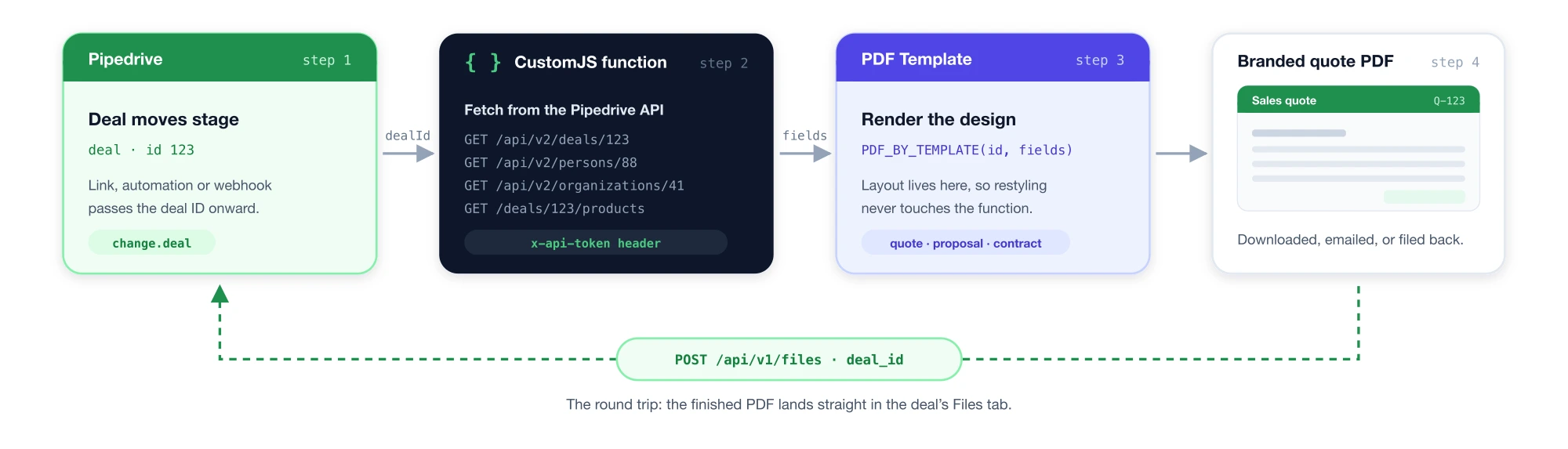
We use the second one everywhere. Links stay short, the data is never stale, and it matters more on Pipedrive than on most CRMs. A quote needs three records, not one: the deal for the price and products, the person to address it to, and the organization to bill. Here is the whole round trip:
The whole round trip: a deal ID goes in, a branded quote comes out, and the PDF can be filed back on the deal. The same flow powers all three options below.
Prerequisite: A Pipedrive API Token
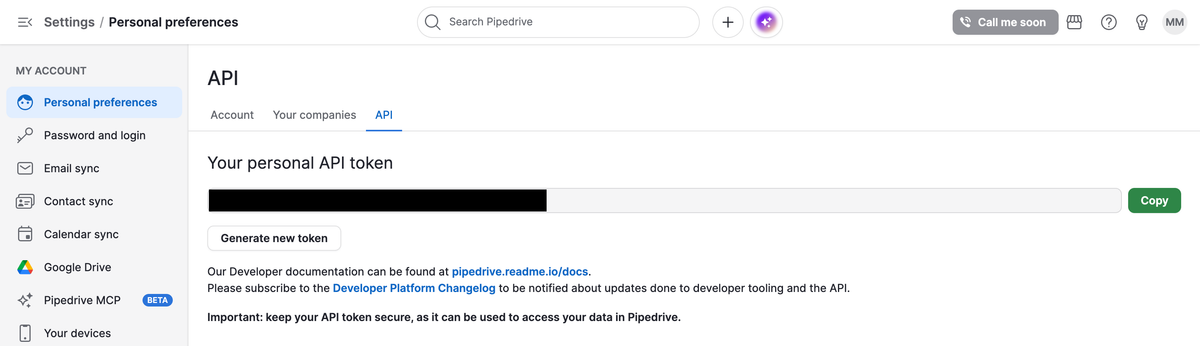
All three options read data through the Pipedrive API, which needs a token. Click your account name in the top right, then go to Company settings → Personal preferences → API, and copy the personal API token shown there. Two things to know. You only get one token at a time, so generating a new one instantly breaks anything still using the old one. And the token belongs to a person, so it can see exactly what that person can see. For something the whole team relies on, make a separate account for the integration instead of using a salesperson's own token.
One gotcha if you follow an older tutorial. Pipedrive's current API wants the token sent as a header called x-api-token. The old version let you paste it into the web address instead, and that no longer works. The code below already does it the right way. Keep the token inside the function, never in a link or a page someone can view.
The personal API token under Company settings → Personal preferences → API. One active token per user at a time.
The Shared Engine: One CustomJS Function
Every option below calls the same function. It accepts a dealId, fetches that deal from Pipedrive along with its linked person and organization, fills the PDF Template's fields, and returns a PDF. Write it once and reuse it for all three integration styles.
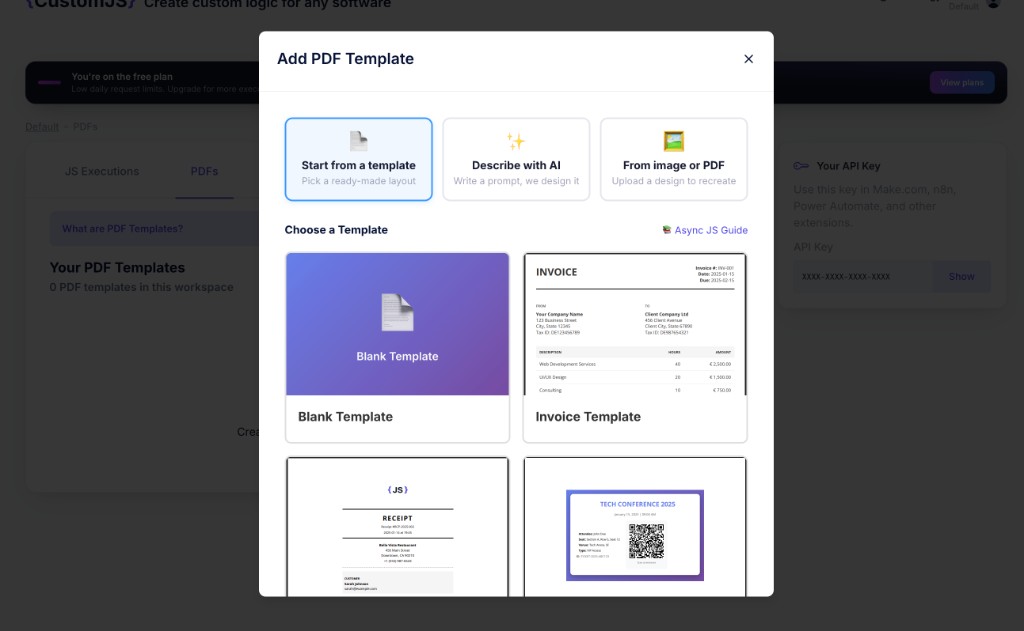
Before writing the function, create the PDF template it will render. In the CustomJS app, open PDF Templates and click Create a PDF template. You can start from a ready-made layout, use Describe with AI to generate a branded design from a prompt, or upload an existing quote or PDF to recreate. A template combines an HTML layout with parameters that your function passes in when it renders the PDF. Once saved, it becomes available inside any function via the Insert PDF Template button in the code editor toolbar.
Creating a PDF Template in CustomJS: pick a ready-made layout, describe what you need with AI, or upload an existing quote to recreate.
The function
With the template saved, create a new JS Execution and use the AI Function Generation to build it. Describe what the function should do in plain language. Name the template you want it to import so the AI wires it in. Something like this:
Create a JS function which receives a Pipedrive dealId as a GET parameter,
then pulls the deal, its linked person and organization from the Pipedrive API
and imports my "Sales Quote" PDF Template to generate the PDF.
Because the prompt names the template, the AI imports it with its ID and fields already filled in, alongside the Pipedrive API calls. You just need to add your API token. The result will look like this:
// CustomJS stored script: "Pipedrive deal -> quote PDF"
// Called as: https://e.customjs.io/<script-id>?dealId=123
const { PDF_BY_TEMPLATE } = require('./utils');
const axios = require('axios').default;

// Kept inside the stored function (server-side), never in the link or page.
const PIPEDRIVE_TOKEN = 'xxxxxxxxxxxxxxxxxxxxxxxxxxxxxxxxxxxxxxxx';
const PD = axios.create({
  baseURL: 'https://api.pipedrive.com/api/v2',
  headers: { 'x-api-token': PIPEDRIVE_TOKEN },
});

const dealId = input.dealId;

// A quote needs three objects, because the deal only holds person_id and org_id.
const deal = (await PD.get('/deals/' + dealId)).data.data;

const [person, org, products] = await Promise.all([
  deal.person_id ? PD.get('/persons/' + deal.person_id).then(r => r.data.data) : null,
  deal.org_id ? PD.get('/organizations/' + deal.org_id).then(r => r.data.data) : null,
  PD.get('/deals/' + dealId + '/products').then(r => r.data.data || []),
]);

const items = products.map(p => ({
  description: p.name,
  quantity: p.quantity,
  unitPrice: p.item_price,
  total: p.quantity * p.item_price,
}));
const subTotal = items.reduce((sum, i) => sum + i.total, 0);
const taxRate = 0.20;

// 'zJfQWl' is the template's ID, wired in by the AI.
const pdfData = await PDF_BY_TEMPLATE('zJfQWl', {
  quoteNumber: 'Q-' + dealId,
  createdDate: new Date().toISOString().slice(0, 10),
  validUntil: new Date(Date.now() + 30 * 24 * 60 * 60 * 1000).toISOString().slice(0, 10),
  companyLogo: '',
  senderName: 'Your Company',
  senderAddress1: '123 Your Street',
  senderAddress2: 'Your City, Your State',
  receiverName: org ? org.name : (person ? person.name : ''),
  receiverContact: person ? person.name : '',
  receiverEmail: person && person.emails && person.emails[0] ? person.emails[0].value : '',
  receiverAddress1: org ? (org.address || '') : '',
  dealTitle: deal.title,
  items: JSON.stringify(items),
  currency: deal.currency,
  subTotal: subTotal,
  taxRate: taxRate,
  taxAmount: subTotal * taxRate,
  total: subTotal * (1 + taxRate),
  footerText: 'This quote is valid for 30 days.',
});

return pdfData;
Nothing here needs installing. PDF_BY_TEMPLATE and axios come with the runtime, and the native API documentation lists the rest. The only surprise is that it asks Pipedrive three questions instead of one. A deal only stores a pointer to its person and its company, so their email and address have to be fetched separately, and the products are a fourth request. The design itself lives in the template, so you can restyle the quote without editing any of this.
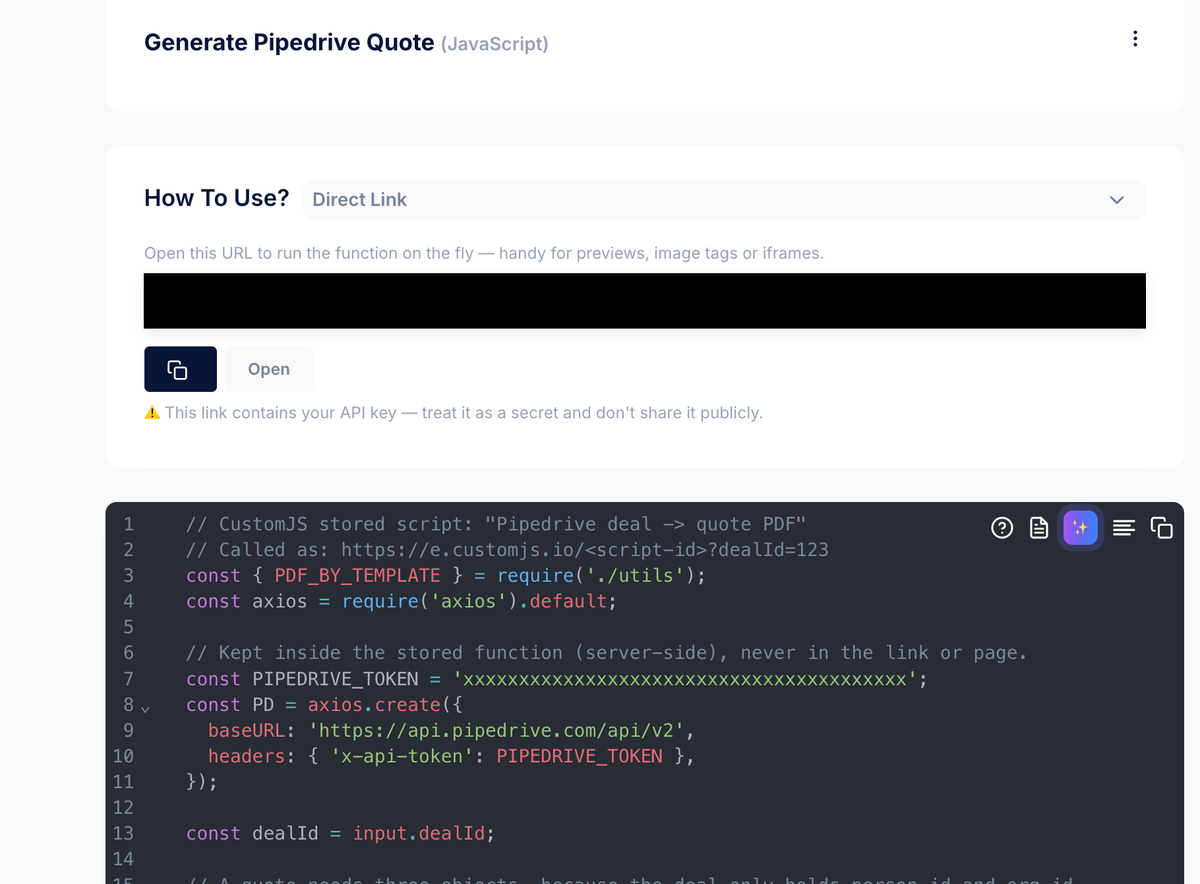
The saved function in the CustomJS editor. The Direct Link at the top is the invocation URL, and it carries your API key, so treat it as a secret.
Saved, the function gets a unique URL. Calling it with a deal ID returns the PDF directly. That single line is the entire "API," and it is what the next three options point at:
# The function URL IS your Pipedrive PDF API
curl 'https://e.customjs.io/your-function-id?dealId=123' \
  -H 'x-api-key: YOUR_API_KEY' \
  > quote.pdf
Option 1 · Any Plan: A Static Link + Hosted "Enter Deal ID" Page
If your plan has no automations, there is no native way to build a per-deal link with each deal's ID baked in. Any link you put on a deal is static and identical everywhere. That changes how the ID gets passed in, not whether the PDF works. The static link points at a small hosted page that asks for the ID and redirects to the function. Host that page on CustomJS's HTML hosting so there is no separate site to maintain.
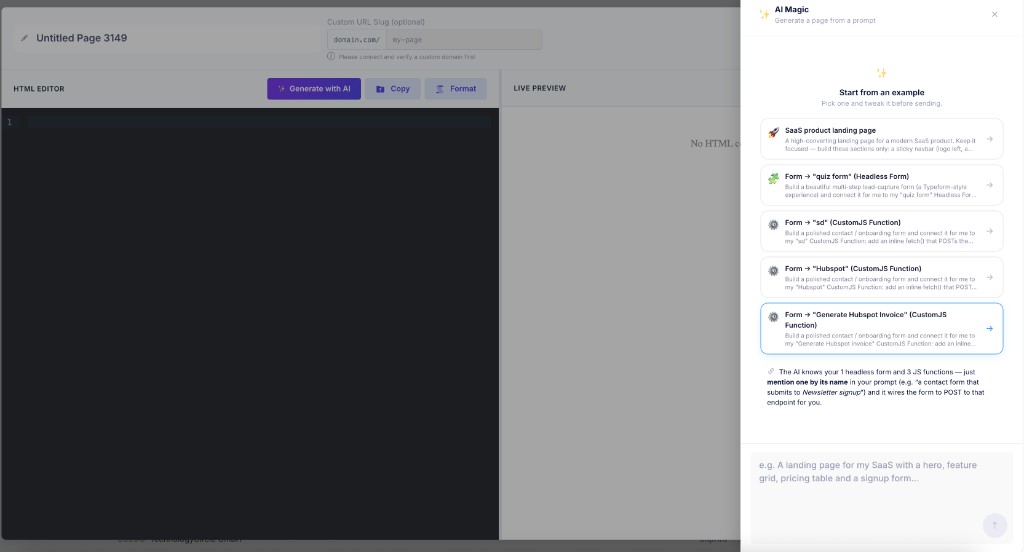
You can build this page in seconds with the AI Page Generation. In the CustomJS app open HTML Pages, describe what you need (for example, "A page that asks for a Pipedrive deal ID and redirects to my Sales Quote function"), and the AI generates the hosted page with the form and redirect wired up.
The AI Page Generation modal in CustomJS. Describe the page you need and the AI builds it, wiring it to your function automatically.
If you prefer to write the HTML yourself, paste the markup below instead:
<!doctype html>
<html>
  <head><meta charset="utf-8" /><title>Generate quote</title></head>
  <body>
    <h1>Generate quote PDF</h1>
    <p>Paste a Pipedrive deal ID to create the quote.</p>
    <!-- A plain GET form: the browser builds ?x-api-key=...&dealId=... -->
    <form action="https://e.customjs.io/your-function-id" method="get">
      <input type="hidden" name="x-api-key" value="YOUR_CUSTOMJS_API_KEY" />
      <input name="dealId" placeholder="Paste the deal ID" required />
      <button type="submit">Create quote</button>
    </form>
  </body>
</html>
Either way, surface the page's URL on every deal as a clickable field. Here is the full setup:
Host the page. In the CustomJS app open HTML Pages, use the AI or paste the HTML above (with your function ID and API key filled in), and Save Page. Copy the public URL it returns, for example https://lp.customjs.space/abc123. Because a clicked link cannot send a header, the key lives in this page, so treat the URL as internal.
Create the field. In Pipedrive go to Settings → Data fields → Deal → Add custom field. Name it Generate quote and pick the field type Text.
Show it on the deal. Open any deal, expand the Details panel, and make sure the new field is visible (use Customize fields if it is collapsed under "hidden fields").
Set the link. Paste your hosted-page URL as the field's value. Pipedrive renders a URL in a text field as a clickable link.
Use it. A rep opens the deal, clicks Generate quote, pastes the deal ID, and the branded PDF opens. Everything that matters works with no plan upgrade: API access, the data fetch, the render. The only thing you trade is a one-time ID paste.
Option 2 · Automation Tier: A One-Click Per-Deal Link
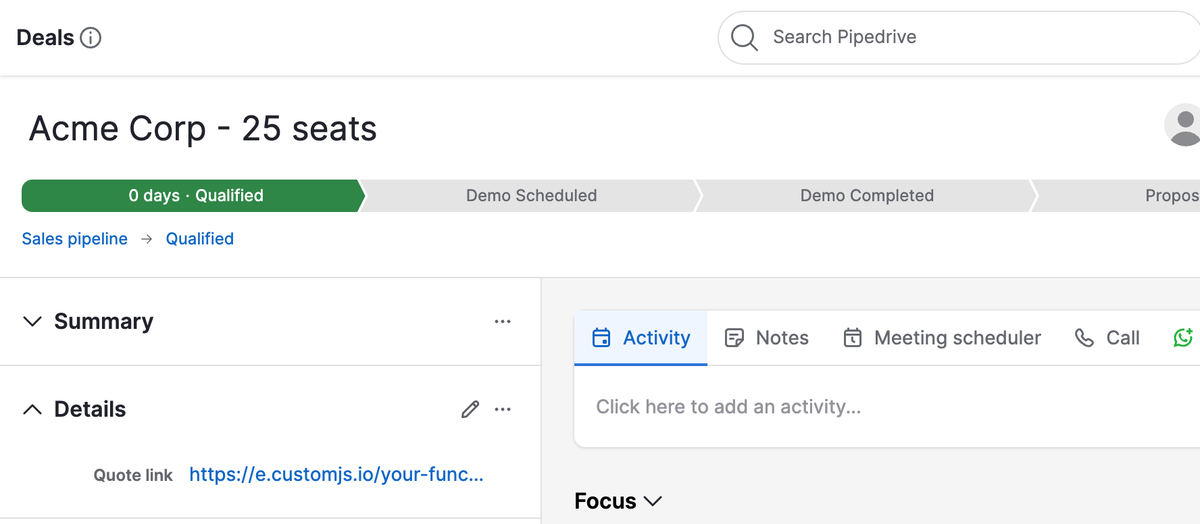
Once your plan includes automations, the manual paste disappears. Build an automation that fires on a trigger of your choice (deal created, or deal stage updated) and have it update a custom field, call it Quote link, whose value is the function URL with that deal's ID already baked in. In the "Update deal" action, type the URL and insert the deal's ID from the field picker rather than typing a token by hand. Pipedrive resolves the merge field when the automation runs:
# Automation action: Update deal -> "Quote link"
# Insert the deal ID from Pipedrive's field picker, do not type the token by hand:
https://e.customjs.io/your-function-id?dealId={deal.id}

# Result on every deal (resolved by Pipedrive when the automation runs):
https://e.customjs.io/your-function-id?dealId=123
Now every deal carries its own working link. The rep opens the deal, clicks Quote link, and the branded quote renders, with no IDs, no copy-paste, and no leaving Pipedrive. This is the sweet spot for quotes and proposals that a human reviews before sending.
The result on the deal itself. Quote link holds that deal's own URL, and Pipedrive renders it as a clickable link.
Option 3 · Any Plan: Native Webhooks, Fully Automated
This is where Pipedrive is genuinely better than the CRMs it competes with. On HubSpot, the no-human path needs a workflow custom-code action, which means Operations Hub. On Pipedrive, plain webhooks ship on every plan. A deal changing stage can call your function directly, with no automation tier, no add-on, and no middleware in between.
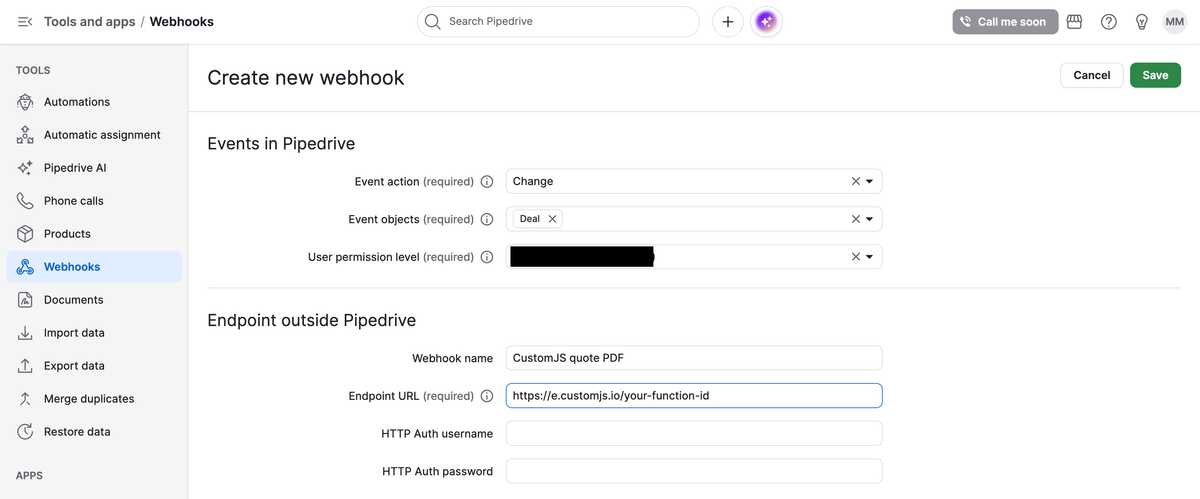
Create the subscription in Settings → Tools and apps → Webhooks, or over the API with POST /v1/webhooks. Pipedrive offers two kinds here and the names are easy to mix up: a plain Webhook fires when a user action changes a record, while an Automated webhook fires from inside an automation. You want the plain one, because it is the kind that needs no automation tier.
The form asks for an event_action, one or more event_object values, and your endpoint URL. For "a deal moved stage," that is Change on Deal. Watch the version here, because it is the most common source of a webhook that silently never fires: v2 uses create, change, and delete, while the older v1 used added, updated, and deleted. Write v2 subscriptions.
Two fields on that form are easy to skip past. User permission level controls how much the webhook is allowed to see, so set it to the same shared account that owns your API token rather than to one rep. If you point it at a person and their access changes later, the webhook quietly starts sending less. The HTTP Auth boxes are optional and worth filling in. They put a username and password on your endpoint so a stranger who guesses the address cannot fire fake deals at it.
Creating the webhook under Settings → Tools and apps → Webhooks: event action change, event object deal, subscription URL pointing at the function.
What Pipedrive sends you
A v2 payload has three top-level keys. meta describes the event, data is the object as it looks now, and previous holds only the fields that changed. That last one is the useful part: it is how you tell "this deal moved into Qualified" apart from "someone edited the deal's note," without keeping any state of your own.
Because change.deal fires on every deal edit, the handler's first job is to exit early on anything that is not a stage move into the stage you care about. Skip that guard and you will render a quote every time a rep retypes a phone number.
// CustomJS stored script: Pipedrive webhook -> quote PDF
// Subscribed as: event_action "change", event_object "deal"
const { PDF_BY_TEMPLATE } = require('./utils');
const axios = require('axios').default;

const PIPEDRIVE_TOKEN = 'xxxxxxxxxxxxxxxxxxxxxxxxxxxxxxxxxxxxxxxx';
const QUALIFIED_STAGE_ID = 4;

const { meta, data, previous } = input;

// change.deal fires on every deal edit, so exit unless this is a move
// into the stage we care about.
if (meta.action !== 'change' || meta.entity !== 'deal') return { skipped: 'wrong event' };
if (!previous || previous.stage_id === undefined) return { skipped: 'stage did not change' };
if (data.stage_id !== QUALIFIED_STAGE_ID) return { skipped: 'not the qualified stage' };

const pdfData = await buildQuotePdf(data.id);

return { generated: true, dealId: data.id };
This is the right fit for documents that should fire on an event rather than a click: a quote the moment a deal is qualified, a contract the moment it is won. No human touches anything, and the PDF is already filed on the deal by the time the rep looks.
Which Option Should You Choose?
Match the row to your plan and to how hands-off the document needs to be. Note that the fully automated row is not the expensive row here.
Option
Pipedrive plan
Automation
Manual step
Best for
1 · Static link + ID page
Any plan
Manual
Paste the deal ID
Occasional quotes, low volume
2 · Per-deal link via automation
Automation tier
One click
None (click the link)
Quotes a rep reviews before sending
3 · Native webhook
Any plan
Fully automated
None (hands-off)
Quotes on stage change, contracts on win
All three call the identical function, so you can start with a static link and graduate to a webhook later without rewriting anything. And because webhooks are ungated, Option 3 is a legitimate starting point rather than an endgame: if a stage change is your trigger, skip straight to it.
Filing the PDF Back on the Deal
Generating the quote is half the job. Most teams also want it filed on the deal where the whole team can see it. Pipedrive makes this unusually easy. A single upload to /api/v1/files, tagged with the deal's ID, drops the PDF straight into that deal's Files tab. From there it appears in the timeline and can be attached to an email without leaving the CRM.
// Attach the finished PDF to the deal's Files tab.
const FormData = require('form-data');

const form = new FormData();
form.append('file', Buffer.from(pdfData, 'base64'), {
  filename: 'quote-' + dealId + '.pdf',
  contentType: 'application/pdf',
});
form.append('deal_id', String(dealId));

await axios.post(
  'https://api.pipedrive.com/api/v1/files?api_token=' + PIPEDRIVE_TOKEN,
  form,
  { headers: form.getHeaders() }
);
One oddity: this upload is on Pipedrive's older API, so the token goes in the web address here instead of in a header. Having both styles in one function looks wrong but is correct. Swap deal_id for person_id or org_id to file the document against the contact or the company instead.
To also email it to the prospect, add a mail step after the upload. If you would rather keep that part no-code, a Make.com or n8n scenario can watch the same webhook and chain the send. See PDF generation in Make.com and PDF generation in n8n for those recipes.
One Function, Many Templates
Because the function only renders whatever template you point it at, the same engine produces a quote, a proposal, or a contract. Create each design as its own PDF Template in CustomJS (or let the AI generate one), then swap which template the function references. The code stays the same. Only the template changes.
Quote: a line-item layout with discount and totals, like the running example above.
Proposal: a multi-page document with a cover, scope sections, and pricing, using page-break rules between sections.
Contract: a legal-style document with a signature block, ideal for the Option 3 auto-file flow on deal won.
To switch templates, ask the AI assistant in the editor to swap in a different saved template (or use Insert PDF Template in the toolbar); the PDF_BY_TEMPLATE call is regenerated with the new template's ID and fields. For documents that need a chart, barcode, or QR code, render them with JavaScript inside the template and signal completion. See rendering JavaScript before PDF capture.
vs. Smart Docs, PandaDoc & Proposify
Smart Docs is the honest first thing to consider, and for some teams it is the right answer. If your quotes are simple, your branding is flexible, and you are already on a plan that bundles it, use it. It lives inside Pipedrive, and that is worth a lot.
Where it stops working is customization and cost shape. You are limited to what its template editor supports, and on lower plans it is a paid company-level add-on on top of your seats. The dedicated document tools have the same shape at a higher price: PandaDoc, Proposify, and Better Proposals charge per user per month and gate e-sign, CRM sync, and analytics behind higher tiers, so the bill grows with headcount even when document volume does not.
The API-first pattern collapses seat pricing entirely. Every rep triggers the same function. Every function renders the same template. The cost is just PDFs generated, 600 per month free and flat usage-based pricing after that. What you give up is the drag-and-drop editor, and what you get back is a PDF Template you can create with AI or design yourself. Most engineering-led sales teams call that an upgrade.
One caveat on the numbers above. Plan names, bundling, and add-on pricing were checked in August 2026. Pipedrive reshuffled its whole lineup in 2025, so confirm the current tiers on Pipedrive's own pricing page before you budget anything.
Frequently Asked Questions
1. Does this require a paid Pipedrive plan or the Smart Docs add-on?
No. Options 1 and 3 work on any plan, because webhooks are available on all Pipedrive plans. Only Option 2 needs the automations feature, and it is the convenience path rather than the powerful one. You never need Smart Docs.
2. Why does my webhook fire but nothing happens?
Usually one of two things. Either the subscription was created against the v1 event names (updated.deal) while you are reading a v2 payload, or the handler's guard is rejecting the event because previous does not contain stage_id. Log the whole meta object once and the mismatch is obvious.
3. Do I have to use Zapier or Make?
No. Pipedrive's native webhook calls your function directly, so there is no middleware in the chain at all. Make.com and n8n are useful when you want to chain extra steps such as sending mail or posting to Slack without writing them yourself, not because Pipedrive requires them.
4. Where does my Pipedrive API token live?
In the stored function on the server side, never in a link or a hosted page. The browser only ever sees a deal ID. Because a Pipedrive token is tied to one user and you can only have one active at a time, use a dedicated integration user rather than a rep's personal token, so rotating it does not break a person's own integrations.
5. Can I generate from a person or an organization instead of a deal?
Yes. Point the fetch at /api/v2/persons/{id} or /api/v2/organizations/{id} and pass that object's ID instead. The webhook event_object changes to person or organization to match. The render step is unchanged.
6. How many PDFs can I generate for free?
600 per month per account, with no credit card. That covers most quoting volumes. Past it the pricing is flat and usage-based rather than per-seat, so adding reps does not add cost.
Wrap-up
Generating branded quotes from Pipedrive does not require the Smart Docs add-on, a per-seat proposal tool, or a middleware subscription. It needs one function that turns a deal ID into a document, and a link, an automation, or a webhook to call it.
The detail worth remembering is that Pipedrive gives away the piece other CRMs charge for. Webhooks are on every plan, so the fully automated version is available to you on day one. Start wherever your team is, and the function never changes.
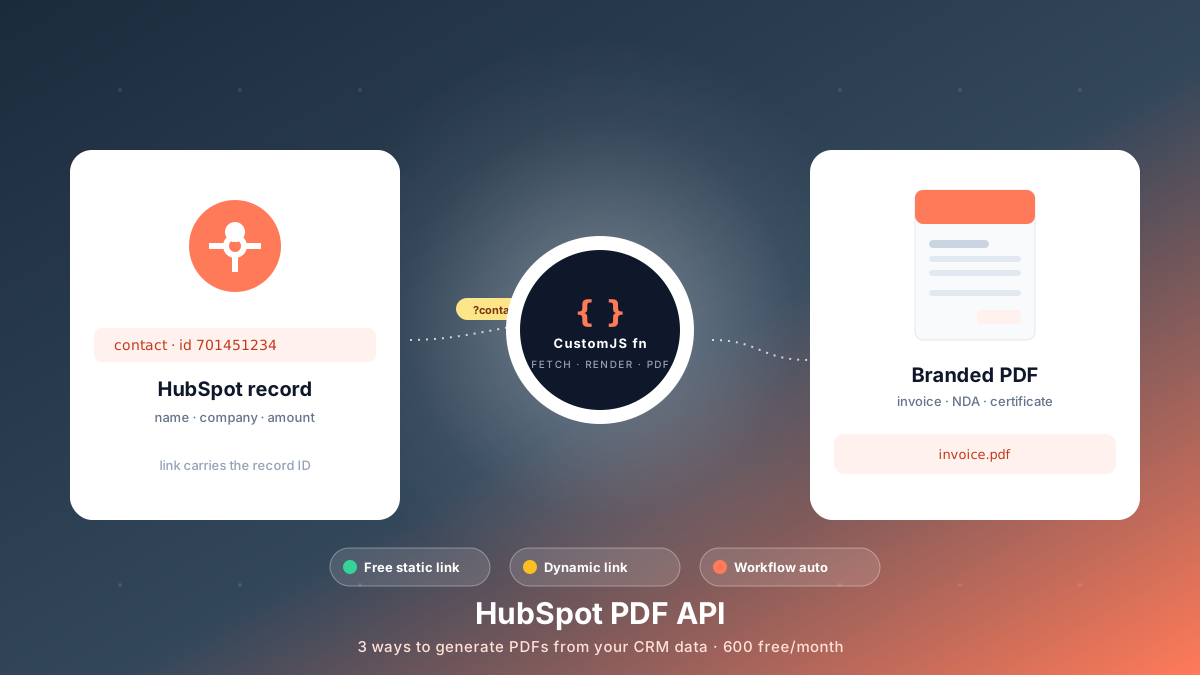
Generate branded PDFs - invoices, NDAs, quotes, certificates - straight from HubSpot data. Three approaches, from a free no-code link to fully automated workflows. 600 free PDFs/month.
Looking for a PDFMonkey alternative? Compare PDFMonkey vs CustomJS on price, free tier, and JavaScript rendering, with a step-by-step Make.com and n8n migration guide. 600 free PDFs/month.
Carbone alternative compared: CustomJS vs Carbone on template model, pricing, and JS rendering, plus a docx to HTML migration guide. 600 free PDFs/month.