Capture Website Screenshots in n8n
Taking a screenshot in a workflow usually means running a browser somewhere, which is exactly what you do not want on n8n Cloud. This template does it with a single node: a URL goes in, a PNG comes out as binary data on the item.
600 free requests / month, no credit card
- Task
- Website screenshot
- Platform
- n8n, cloud or self-hosted
- Nodes
- 2
- Output
- PNG, binary
// live preview
Try it on a real URL first
Type a URL and capture it. This runs against the same endpoint the n8n node calls, so the image the node returns is the image you get here.
// the workflow
Two nodes, URL to PNG
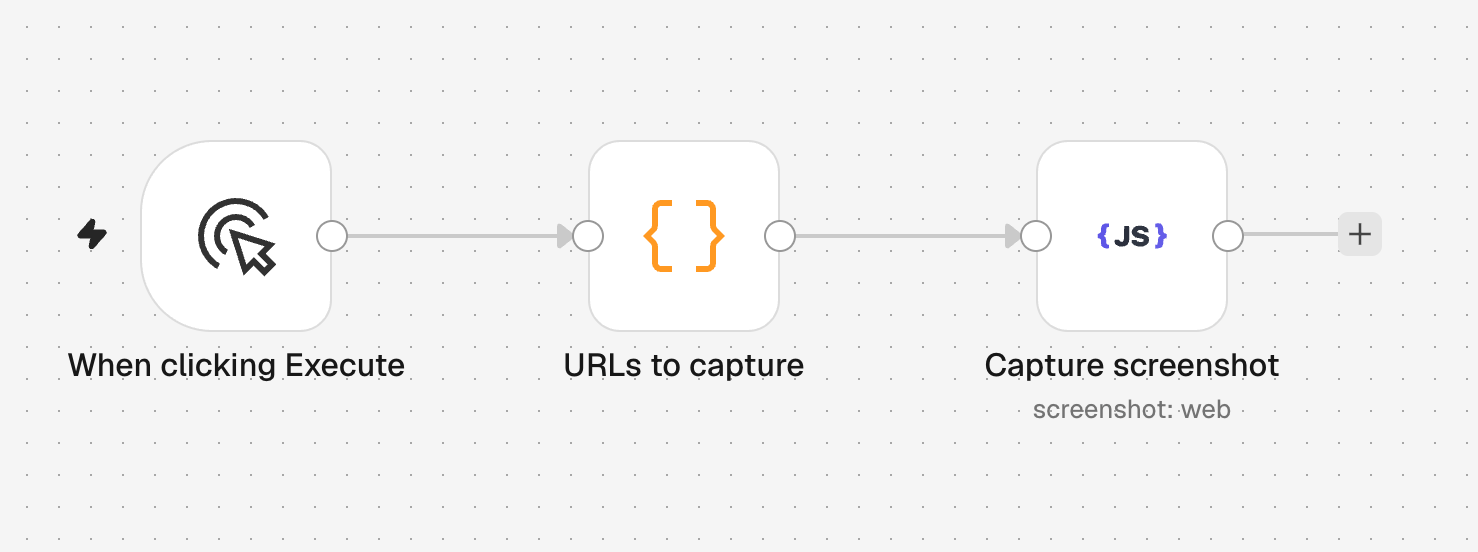
Import the JSON with Workflows, Import from File. The node is the same CustomJS node you may already use for PDFs, with the resource switched to Web.
The node in the exported workflow
{
  "parameters": {
    "resource": "web",
    "operation": "screenshot",
    "url": "={{ $json.url }}",
    "outputFilenamePng": "=shot-{{ $itemIndex }}.png"
  },
  "name": "Capture screenshot",
  "type": "@custom-js/n8n-nodes-pdf-toolkit-v2.pdfToolkit",
  "typeVersion": 1
}
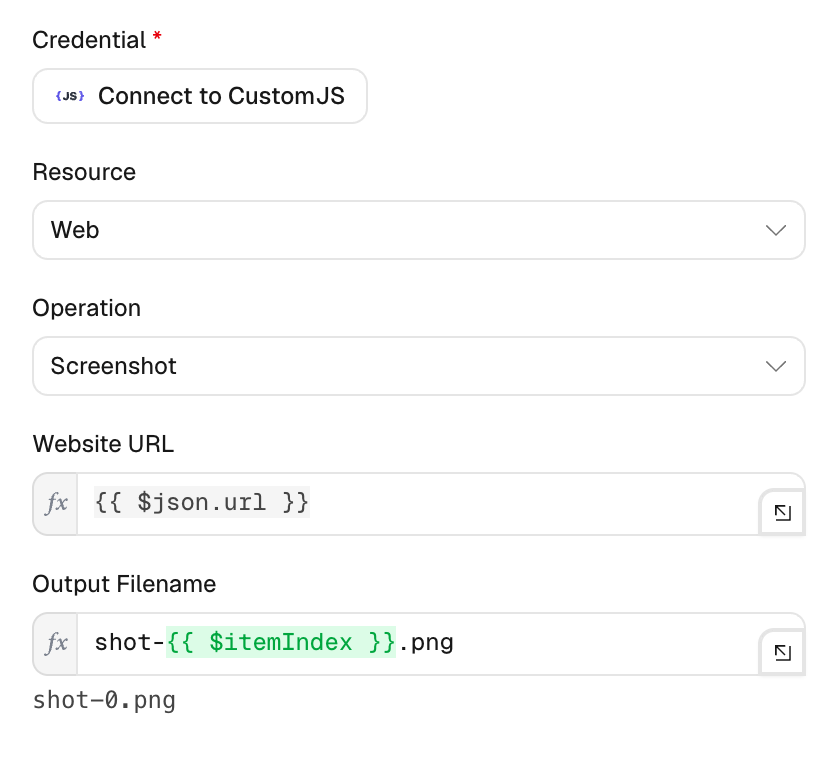
What the node looks like
// step by step
Build it yourself
- 1
Install the CustomJS node
Open the node panel and search for CustomJS. The node is published, so on n8n Cloud it is in the list already and nothing has to be installed. On a self-hosted instance, add it once under Settings, Community nodes as
@custom-js/n8n-nodes-pdf-toolkit-v2. The installation page has the details. - 2
Add your API key
Create a credential of type CustomJS API and paste the key from your workspace. One key covers PDF, screenshots and the other endpoints.
- 3
Set resource and operation
On the CustomJS node choose Resource: Web and Operation: Screenshot. A single Website URL field appears. Switch it to an expression to take the URL from the incoming item.
- 4
Give each file its own name
Set Output Filename to an expression. Running the node over a list of URLs otherwise produces a folder of files all called screenshot.png.
- 5
Do something with the image
The PNG arrives as binary data on the item, so the next node can be Google Drive, S3, Slack or an HTTP request. Nothing is written to disk in between.
// the request
The same capture outside n8n
The node is a wrapper around one endpoint. Knowing the raw shape helps when you need a capture from somewhere n8n is not, or when you are debugging what the node sent.
The call behind the node
curl -X POST https://e.customjs.io/<your-function-id> \
  -H "Content-Type: application/json" \
  -H "x-api-key: YOUR_API_KEY" \
  -d '{ "url": "https://www.example.com" }' \
  --output screenshot.png
The stored function it runs
const { SCREENSHOT } = require('./utils');

return SCREENSHOT(input.url);
The screenshot API reference covers the response headers, the error codes and the rate limits.
Questions about this template
Related templates
A scenario that turns a URL into a PNG with the Website Screenshots module, including clicks and form input before the shot if the page needs them.
A Zap step that turns a URL into a PNG and hands the file to Slack, Drive or an email step. No browser, no file juggling.
A scheduled workflow that signs in, captures the dashboard and posts the image to a Slack channel every morning. Interactions run before the shot.
Capture your first page
Create a workspace, add the API key to n8n, import the workflow and run it.