Monitor a Page for Visual Changes with n8n
Competitor pricing pages, your own checkout, a partner status page: all of them change without telling you. This workflow captures them every morning, keeps the images as an archive, and tells you when something moved.
600 free requests / month, no credit card
- Task
- Scheduled page monitoring
- Platform
- n8n, cloud or self-hosted
- Runs
- Daily, one item per watched page
- Output
- PNG archive plus an alert
// live preview
Check the capture before you schedule it
A monitor is only as good as its first capture. Run the page here once, deal with the cookie banner, and then put the sequence on a schedule.
// the workflow
Schedule, capture, store, compare
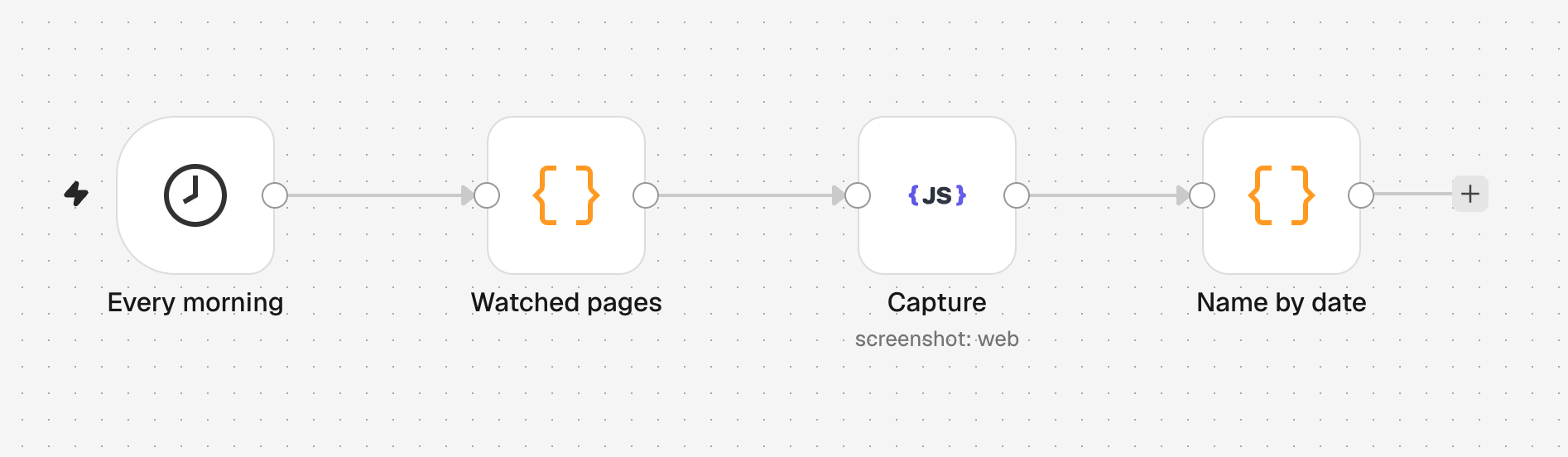
The list of watched pages lives in a data source rather than in the workflow, so adding a page is a row and not an edit. Each item carries its own URL and its own notification target.
Naming files so the archive is searchable
// Code node before the upload
const day = new Date().toISOString().slice(0, 10);
const safe = $json.url.replace(/^https?:\/\//, '').replace(/[^a-z0-9]+/gi, '-');

return [{ json: { ...$json, path: `monitor/${day}/${safe}.png` } }];
A change check that does not cry wolf
// Comparing bytes flags every ad rotation, so compare a hash of the page text instead
const { createHash } = require('crypto');

const hash = createHash('sha256').update($json.pageText.trim()).digest('hex');
const changed = hash !== $json.previousHash;

return [{ json: { changed, hash } }];
What the node looks like
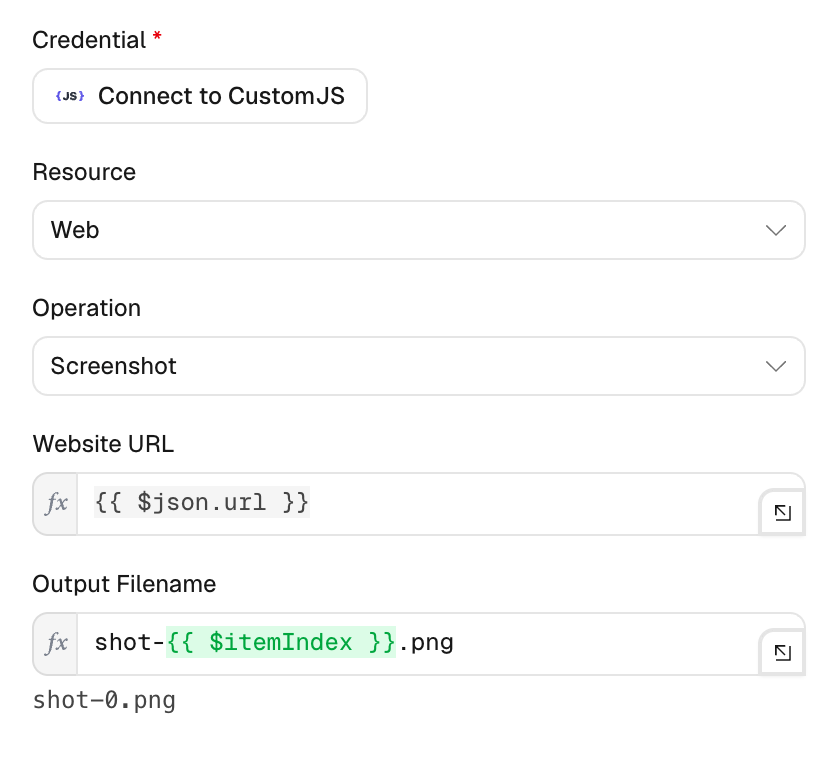
// step by step
Build it yourself
- 1
Install the CustomJS node
Open the node panel and search for CustomJS. The node is published, so on n8n Cloud it is in the list already and nothing has to be installed. On a self-hosted instance, add it once under Settings, Community nodes as
@custom-js/n8n-nodes-pdf-toolkit-v2. The installation page has the details. - 2
Add your API key
Create a credential of type CustomJS API and paste the key from your workspace. One key covers PDF, screenshots and the other endpoints.
- 3
Keep the watch list out of the workflow
A spreadsheet or a table with one row per page, each with a URL and who to notify. Adding a page then never means editing a workflow, which is what keeps a monitor alive past the first month.
- 4
Capture and archive by date
Store every capture under a dated path. The archive is the part people actually use later, when the question is what the page looked like in September.
- 5
Compare text, not pixels
Two captures of the same page rarely match byte for byte. Fetch the page text alongside the image and hash it, so rotating banners and timestamps do not trigger an alert every morning.
- 6
Alert with the before and after
Send both images in the message. A notification saying a page changed is a task, a notification showing what changed is an answer.
// keeping it useful
Why most page monitors get muted
Monitors fail in one of two ways: they alert too often and get ignored, or they break quietly and nobody notices. Both have the same fix, which is deciding up front what counts as a change.
Narrow the comparison to what matters
// Watching a pricing page: compare only the prices, not the whole page
const prices = [...$json.pageText.matchAll(/[€$]\s?\d[\d.,]*/g)].map(m => m[0]);

return [{ json: { fingerprint: prices.join('|') } }];
Notice when the monitor itself breaks
// A capture that suddenly shrinks usually means a block page or an error page
const suspicious = $binary.data.fileSize < 20000;

return [{ json: {
  ok: !suspicious,
  reason: suspicious ? 'capture far smaller than usual' : null,
}}];
Capture pages you are allowed to capture. Check the terms of a site before putting it on a daily schedule, and keep the frequency to what the question actually needs.
Questions about this template
Related templates
One node turns a URL into a PNG inside your workflow. Full page rendering, binary output, ready to upload, attach or post.
A scheduled workflow that signs in, captures the dashboard and posts the image to a Slack channel every morning. Interactions run before the shot.
Render a 1200 by 630 Open Graph image from an HTML card for every article you publish, without opening a design tool.
Start watching one page
Create a workspace, add the API key, and put a single URL on a daily schedule before adding a list.