Generate Statement of Account PDFs in n8n
Chasing payment one invoice at a time produces a lot of email and little effect. A statement shows the whole account in one page, which is both easier to act on and harder to ignore. This workflow builds one per customer on a schedule.
600 free requests / month, no credit card
- Document
- Statement of account
- Platform
- n8n, cloud or self-hosted
- Runs
- Scheduled, one file per customer
- Output
- PDF, binary
// live preview
One page, the whole account
The ageing row at the top is what makes a statement work: it answers how bad the situation is before anyone reads the table. Change the days late and the colours follow.
// the workflow
Query, group, render, send
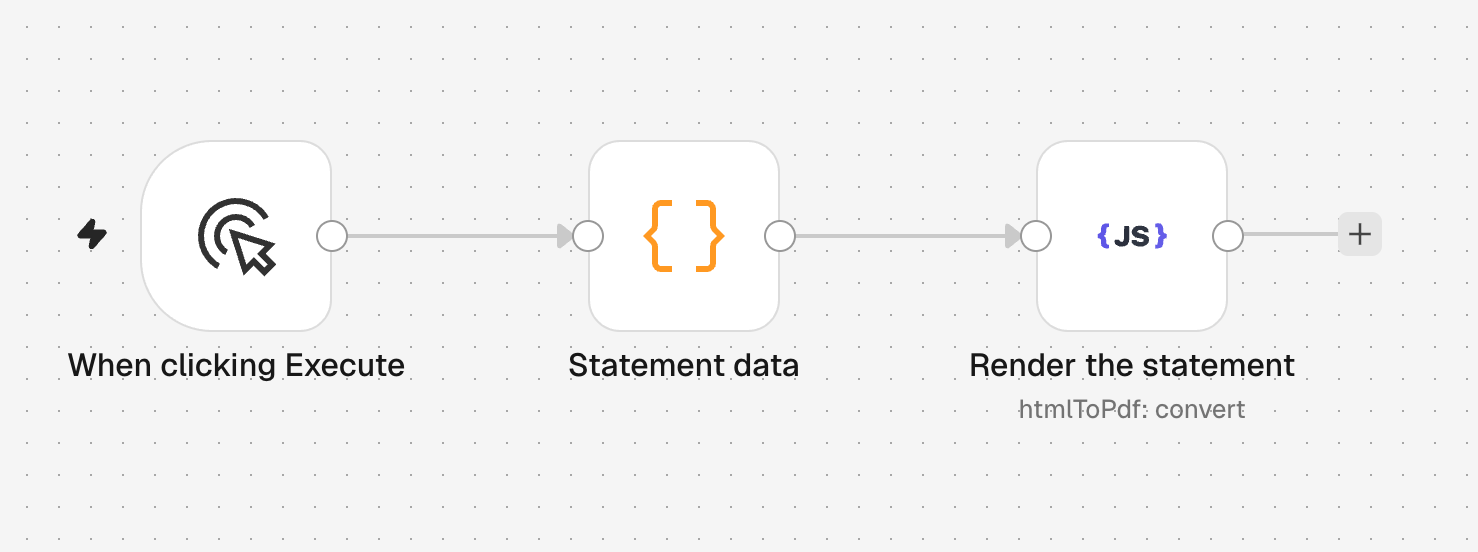
Import the workflow and point the query at your open items. The grouping node is the piece worth keeping: one statement per customer, not one per invoice, is the entire difference between this and a reminder email.
Grouping open items and ageing them
// Code node, run once for all items
const today = new Date();
const days = (d) => Math.floor((today - new Date(d)) / 864e5);

const byCustomer = {};
for (const { json: row } of $input.all()) {
  const late = Math.max(0, days(row.dueDate));
  const bucket = late === 0 ? 'current' : late <= 30 ? 'd30' : late <= 60 ? 'd60' : 'd60plus';

  byCustomer[row.customerId] ??= {
    customer: { name: row.customerName, accountNumber: row.accountNumber },
    openItems: [],
    sums: { current: 0, d30: 0, d60: 0, d60plus: 0 },
  };

  byCustomer[row.customerId].openItems.push({
    reference: row.reference,
    issued: row.issueDate,
    due: row.dueDate,
    daysLate: String(late),
    open: row.openAmount.toFixed(2),
    color: late === 0 ? '#6b7280' : late <= 30 ? '#b45309' : '#c2410c',
  });
  byCustomer[row.customerId].sums[bucket] += row.openAmount;
}

return Object.values(byCustomer).map((json) => ({ json }));
What the node looks like
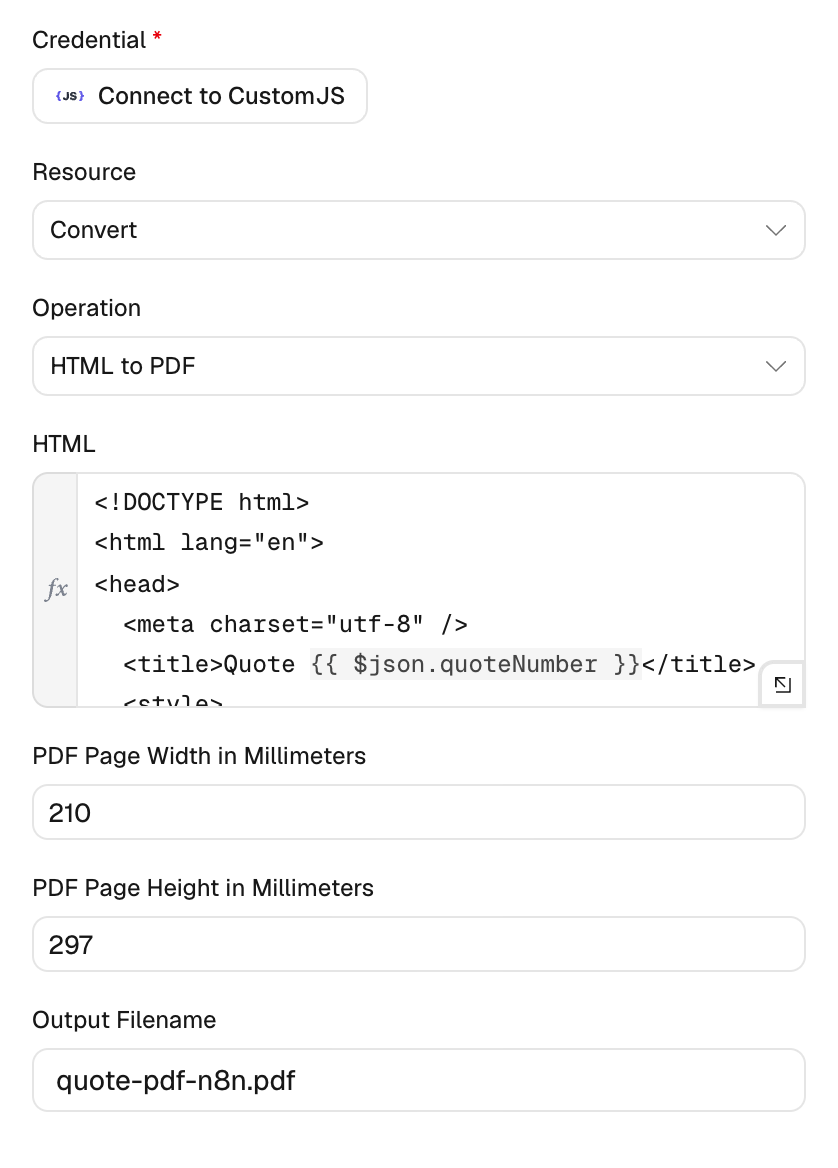
// step by step
Build it yourself
- 1
Install the CustomJS node
Open the node panel and search for CustomJS. The node is published, so on n8n Cloud it is in the list already and nothing has to be installed. On a self-hosted instance, add it once under Settings, Community nodes as
@custom-js/n8n-nodes-pdf-toolkit-v2. The installation page has the details. - 2
Add your API key
Create a credential of type CustomJS API and paste the key from your workspace. One key covers PDF, screenshots and the other endpoints.
- 3
Query open items, not invoices
The statement is about what is still unpaid, so the query filters on the open amount rather than on the invoice date. A fully paid invoice has no place on it.
- 4
Group by customer before the PDF node
One item per customer going into the PDF node means one file per customer coming out. Grouping afterwards is the mistake that produces a hundred single invoice statements.
- 5
Calculate the ageing at render time
Days late is a function of today, not a stored field. Calculating it in the workflow means a statement regenerated next week is correct without anyone touching the data.
- 6
Send it to the accounts payable address
Send to the finance contact rather than the sales contact, and put the total due in the subject. Attach the PDF so the whole account travels with the message.
// html template
Ageing buckets carry the message
The table is the evidence and the buckets are the argument. Both are loops, so neither needs a layout change when a customer has one open item or thirty.
The ageing row
<div class="row" style="gap:12px">
  {% for bucket in ageing %}
  <div style="flex:1;border:1px solid #e5e7eb;border-radius:8px;padding:10px">
    <div class="label">{{ bucket.label }}</div>
    <div style="font-size:14pt;font-weight:700;color:{{ bucket.color }}">
      {{ bucket.amount }}
    </div>
  </div>
  {% endfor %}
</div>
Open items with days late
{% for row in openItems %}
<tr>
  <td>{{ row.reference }}</td>
  <td class="small muted">{{ row.issued }}</td>
  <td class="small muted">{{ row.due }}</td>
  <td class="num" style="color:{{ row.color }}">{{ row.daysLate }}</td>
  <td class="num">{{ row.open }}</td>
</tr>
{% endfor %}
The colour comes from the data rather than from a rule in the template, which keeps the thresholds in one place: the Code node that groups the items.
Questions about this template
Related templates
Turn invoice data from any n8n node into a finished PDF with one CustomJS node. Importable workflow, editable HTML template, no headless browser to run.
Turn a deal in your CRM into a sendable quote PDF, with scope lines, a discount row and an expiry date that the workflow calculates.
Render a delivery note from an order, with ordered against shipped quantities, carrier details and a signature line. No prices on the document.
Send your first statement run
Create a workspace, add the API key to n8n, import the workflow and point it at your open items.